Cosmos Cloud 1.0.0
CosmosCloud
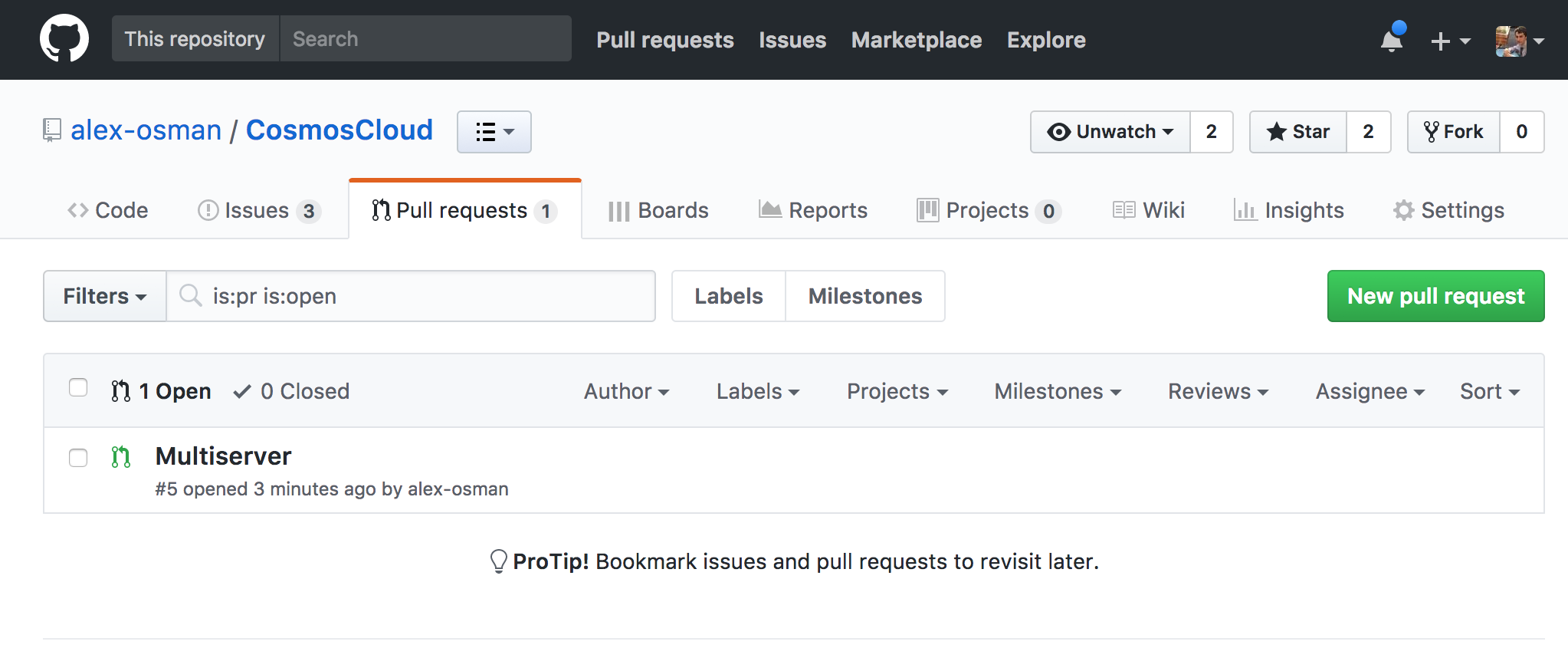
Pull Request
- The above PR allows for multiserver support
- This allows multiple servers to be running at the same time independently
- Below is a screenshot to prove I own the account

Below is the README from the repository
README
The Cosmos Cloud is a smart-home system that is used to control the home (and beyond) through the use of modularized components connected to a central hub. Modules come in both a software and hardware form, interacting completely with the central server. This allows modules to interact with all other modules - giving complete control to the user to tailor to specific use cases, whether it be for accessibility, luxury, or other uses.
Setup
The app is contained in server.js. Before running, make sure to run npm install in the root directory / and bower install in /public.
A SQL server is expected to be running on localhost:3306. You can view and change the database connection in server.js.
Adjust the config.js to your specific setup. The file contains an array of hardware, in the example it is a list of Raspberry Pis. Each module may use different properties of the hardware objects. For example, the /routes/timer.js will execute all functions in the ring array.
**Most modules are configured to disable themselves if the hardware does not exist. Some will throw errors (/routes/rgb.js).
SQL
The application interacts with a sql database running on the server. Default being:
{
host: 'localhost',
user: 'root',
password: 'patsword',
database: 'cosmos'
}
A sample database is included as the file "cosmos.sql". To create a database locally follow these steps:
- Download mysql
- Verify with
which mysqlandwhich mysql.server
- Verify with
- Create user "root" with password 'patsword'
- Start mysql with
mysql.server start - Create database "cosmos" through the shell by
mysql -u root -pandCREATE DATABASE cosmos; - Log out of mysql shell and execute the command
mysql -u root -p < cosmos.sqlto import the database from file
Users
The users section of the database maps devices on the local network to people. The /routes/users.js module will ping each user and note which users are alive (connected to the LAN).
Movies, Pictures, Documents, Music
The assets for movies, pictures and documents are handled by the folder names in server.js. The default is public/assets/{movies or pictures or docs}. Music is not integrated yet.
Ledger
The ledger will keep track of shared funds among groups of people (roommates). This data is held in the database table "ledger". SQL Routes have been removed during refactoring - they are in the backlog.
Live Stream
Live streams relate directly to /routes/theatre.js, in which they can be viewed on your theatre module. Live stream links will eventually be maintained in the SQL database, but are currently hardcoded in public/js/controllers/remoteCtrl.js. Live streams are subject to change and difficult to maintain. Twitch integration will be added shortly (Food is a twitch stream).
In Development
Many features have been tested with proof of concept and are beginning to be implemented, these include:
*Apple Airplay using shairport-sync and related music player information
*Relay Module and electrical socket hookup to Raspberry Pi GPIO pins (control lights/coffee maker/any electrical appliance)
*IR receiver - to control actions using existing IR remotes
*Button - control actions
*Amazon Dash Button - Wireless convenient button to control actions
*To get RSSI values from linux use:
nmcli dev wifi list | egrep "wifi1|wifi2"
Posted on Utopian.io - Rewarding Open Source Contributors
Hey @walnut1 I am @utopian-io. I have just super-voted you at 21% Power!
Achievements
Up-vote this comment to grow my power and help Open Source contributions like this one. Want to chat? Join me on Discord https://discord.gg/Pc8HG9x
Your contribution can't be approved yet. See the Utopian rules. You copied the README file. You did not provide any link to the PR, commits or the project itself. And you need to give a proof that it is your work.
You can contact us on Discord.
[utopian-moderator]
Approved.
Congratulations @walnut1!
Your post was mentioned in the hit parade in the following category: