Vector art how to make your photo in to text
HI! I am Marlon Sanchez from Cavite, Philippines. I am 35 yrs old, I'm a Graphic designer from a small printing shop, "I know it's very late to introduce my self but it's better late than never" I love Art and design challenges because that is my only way to earn some steem! Because I'm not good at writing and my english is "struggle is real"! My inspiration is my wife and my daughter she's 8 months old and her name is Lorene Grace Sanchez.
Here is my work

Process step by step
The Application I use is Adobe Photoshop CC2015
Choose your Photo and type the word that you want to put on your image.
Here is my sample:

Next select the right side of the image. the opposite side of the image that have the text. select it using the rectangular marquee tools (see next sample). Right click inside the marquee tools and select "layer via copy"

Right click again inside the marquee tools and click deselect.
You will see a new layer at the right bottom of the Photoshop under the layer tab "layer 1" you will see a half side of your image. Drag it down.

High light all the text by holding shift key and click the text from top to bottom "text only".
Right click anywhere in the text and select "convert to shape"
Right click again and select "merge shape"
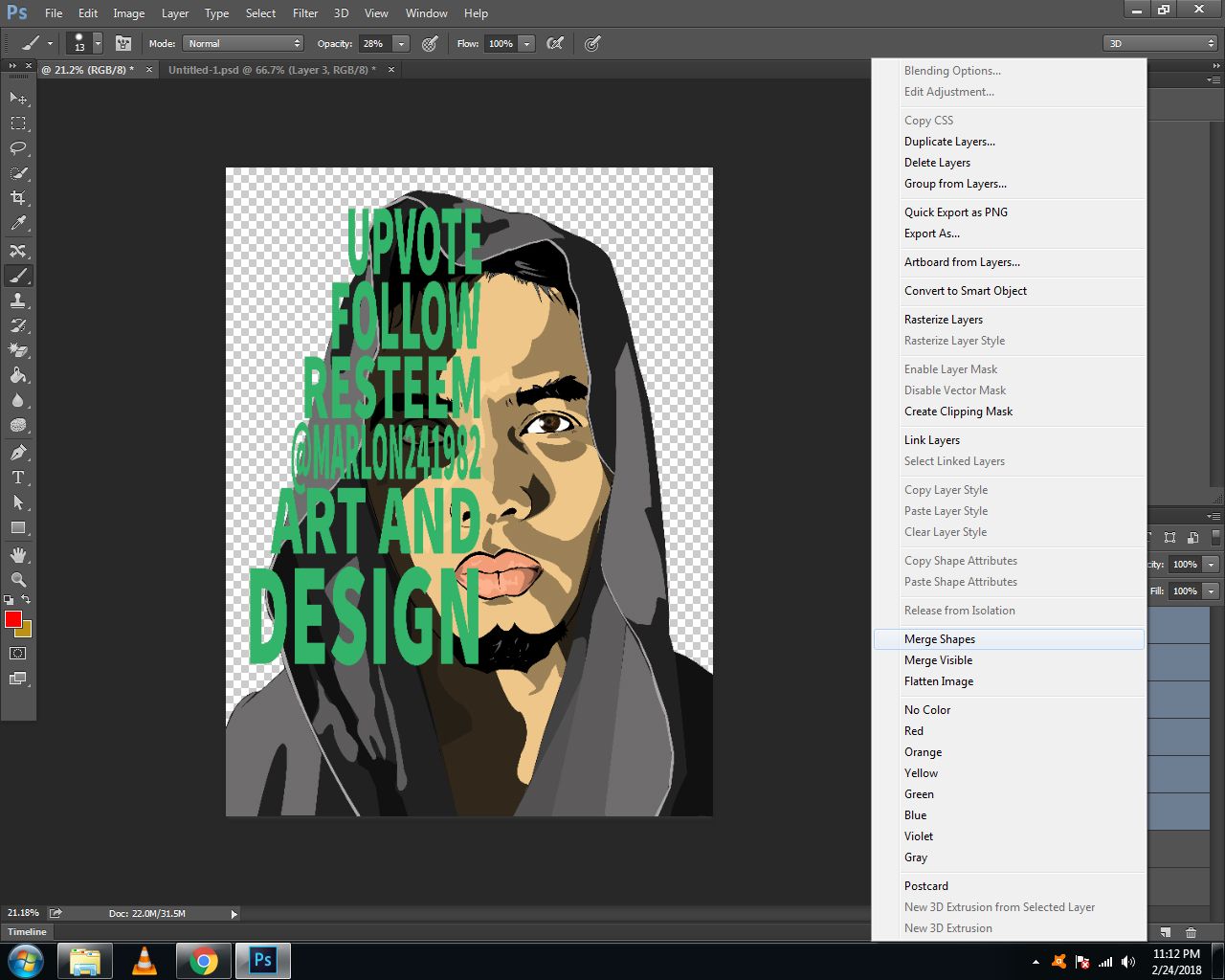
You now have only 3 layers. see my sample on how to arrange the layer
Top The original image
Middle The text that we merge
Bottom The half face

Last step! Right click the top layer and select "create clipping mask"
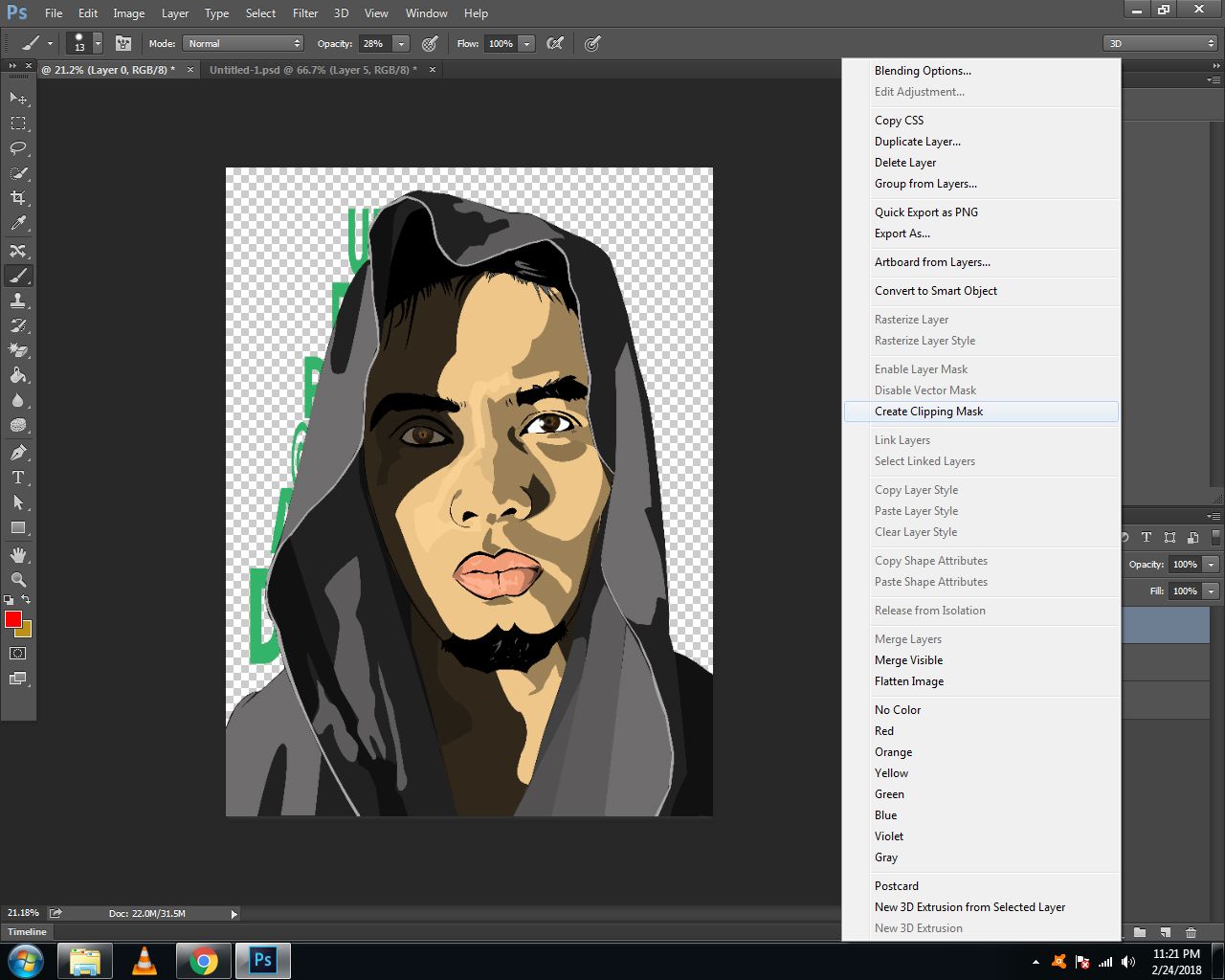
That's it! You now have your personalize image. you can use it on your avatar and banner setting!


Thank you for reading my post!
My Inspiration!

Welcome to steemit @marlon241982 kumusta po? Salamat naman at nagpakilala ka, ilang taon kana palang nag tratrabaho sa printing shop? I wish you all the best and welcome again. =)
Wow... purepinay! Nakita ko n ang profile mo last year at namangha ako sa mga achivements mo at syempre medyo naiingit hindi ko naman kakayanin ang mga narating mo na dito sa steemit. natutuwa naman ako navisit mo ang post ko thank you! Mag 2 years n ko dito s work at sana matulungan nyo rin ako gaya ng iba...
Baka gusto mo ng avatar magsabi ka lang ha... or pang cover it's free!
Welcome to Steem @marlon241982.
Do read A thumb rule for steemit minnows - 50:100:200:25 for starter tips.
Spend time reading Steem Blue Paper to know how Steem blockchian works and if you still have any queries ask them on our Ask me anything about Steemit post and we will try to answer that.
All the Best!!!
nice tutorial
Thanks bro!
Hi Marlon how are you? Really nice intro, i love it ! I would like to connect with other cool steemians, artists and musicians. I’m posting music tutorials and other things related to music (and bitcoins:p). I’m the founder of the free music school communicasound. I'm really pleased to meet you. So i give you my vote, follow you and i will be happy to read your next posts in the futur. If you want, you can do the same and follow me. It’s important to have a family in Steemit :) Greetings from Paris. Peace.
Thank you for spending your time in reading my post.I really appreciate the effort,yes it's true it's nice to have a steemian family...I'm looking forward for it.I will visit your post.Have a good day!
Resteemed by @resteembot! Good Luck!
Curious? Read @resteembot's introduction post
Check out the great posts I already resteemed.
ResteemBot's Maker is Looking for Work.
we have to have photoshop first ..great job though
what a nice family you have
welcome to steemit
Thank you! Yes they need a Ps to make this tutorial and i'm willing to help others if they do not know how to use the ps.