Simple PHP & JS Data Encryption Tool: File to Text
I want to introduce you to a small script that can be an excellent solution for storing your secret data in text form. Yeah, you heard me right - in text! This script is a lightweight browser-based way to encrypt and protect data, it runs on any PHP server and doesn’t need any additional resources like databases or libraries. With it, you can convert any file - an archive, image, text file, or any other document into Base64 and back within seconds. The text-based Base64 version of your file can be stored, sent, printed, or even converted into a QR image for easy reading by a smartphone. It’s safe and very practical. In my opinion this method is perfect for storing backup copies of secret data, but you can also find plenty of other uses for it.
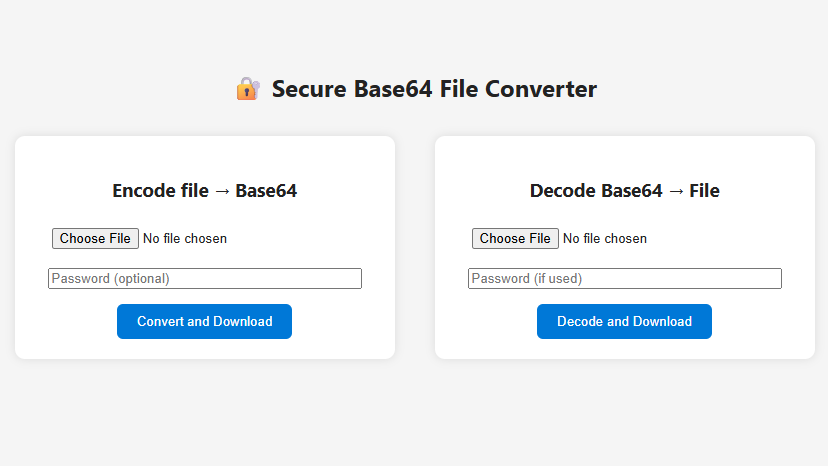
When you set a password, the data is encrypted using the AES-256-CBC algorithm before being encoded in Base64. The decoding process works exactly the opposite: you upload the Base64 text file and enter the password if you used one during conversion . The script decodes your data back into a file, and it automatically downloads in its original form.
When you set a password, the text result turns into unreadable noise and becomes absolutely useless to anyone trying to access the data. I want to emphasize that the password is never stored anywhere and used only at the moment of encryption or decryption.
PHP Encryption Tool:
<?php
// ===== Utility functions =====

// Encrypt binary data with password
function encryptData($data, $password) {
    $method = 'AES-256-CBC';
    $key = hash('sha256', $password, true);
    $iv = openssl_random_pseudo_bytes(16);
    $encrypted = openssl_encrypt($data, $method, $key, OPENSSL_RAW_DATA, $iv);
    return base64_encode($iv . $encrypted);
}

// Decrypt binary data with password
function decryptData($b64data, $password) {
    $method = 'AES-256-CBC';
    $key = hash('sha256', $password, true);
    $raw = base64_decode($b64data, true);
    if ($raw === false || strlen($raw) < 16) return false;
    $iv = substr($raw, 0, 16);
    $encrypted = substr($raw, 16);
    return openssl_decrypt($encrypted, $method, $key, OPENSSL_RAW_DATA, $iv);
}

function downloadFile($content, $filename, $contentType = 'application/octet-stream') {
    header('Content-Type: ' . $contentType);
    header('Content-Disposition: attachment; filename="' . $filename . '"');
    echo $content;
    exit;
}

// ===== ENCODE =====
if ($_SERVER['REQUEST_METHOD'] === 'POST' && $_POST['mode'] === 'encode' && isset($_FILES['file'])) {
    $file = $_FILES['file']['tmp_name'];
    $name = $_FILES['file']['name'];
    $password = $_POST['password'] ?? '';

    if (is_uploaded_file($file)) {
        $data = file_get_contents($file);
        if ($password !== '') {
            $data = encryptData($data, $password);
        } else {
            $data = base64_encode($data);
        }
        $textFile = $name . ".b64.txt";
        downloadFile($data, $textFile, 'text/plain');
    } else {
        echo "<p style='color:red'>Error: failed to upload the file!</p>";
    }
}

// ===== DECODE =====
if ($_SERVER['REQUEST_METHOD'] === 'POST' && $_POST['mode'] === 'decode' && isset($_FILES['b64file'])) {
    $file = $_FILES['b64file']['tmp_name'];
    $name = $_FILES['b64file']['name'];
    $password = $_POST['password'] ?? '';

    if (is_uploaded_file($file)) {
        $encoded = file_get_contents($file);
        $decoded = ($password !== '') ? decryptData($encoded, $password) : base64_decode($encoded, true);

        if ($decoded === false) {
            echo "<p style='color:red'>Error: invalid data or wrong password!</p>";
        } else {
            $originalName = preg_replace('/\.b64(\.txt)?$/i', '', $name);
            downloadFile($decoded, $originalName);
        }
    } else {
        echo "<p style='color:red'>Error: failed to upload the file!</p>";
    }
}
?>

<!DOCTYPE html>
<html lang="en">
<head>
  <meta charset="UTF-8">
  <title>Secure Base64 Converter</title>
  <style>
    body {
      font-family: system-ui, sans-serif;
      background: #f5f5f5;
      padding: 40px;
      color: #222;
      line-height: 1.6;
    }
    h2 {
      text-align: center;
      margin-bottom: 30px;
    }
    .container {
      display: flex;
      gap: 40px;
      justify-content: center;
      flex-wrap: wrap;
    }
    form {
      background: white;
      padding: 20px;
      border-radius: 10px;
      box-shadow: 0 0 10px rgba(0,0,0,0.1);
      width: 340px;
      text-align: center;
    }
    input[type=file], input[type=password] {
      margin-bottom: 15px;
      width: 90%;
    }
    button {
      background: #0078d7;
      color: white;
      border: none;
      padding: 10px 20px;
      border-radius: 6px;
      cursor: pointer;
      font-weight: 500;
    }
    button:hover { background: #005fa3; }
  </style>
</head>
<body>
  <h2>🔐 Secure Base64 File Converter</h2>
  <div class="container">
    <form method="post" enctype="multipart/form-data">
      <h3>Encode file → Base64</h3>
      <input type="hidden" name="mode" value="encode">
      <input type="file" name="file" required><br>
      <input type="password" name="password" placeholder="Password (optional)"><br>
      <button type="submit">Convert and Download</button>
    </form>

    <form method="post" enctype="multipart/form-data">
      <h3>Decode Base64 → File</h3>
      <input type="hidden" name="mode" value="decode">
      <input type="file" name="b64file" required><br>
      <input type="password" name="password" placeholder="Password (if used)"><br>
      <button type="submit">Decode and Download</button>
    </form>
  </div>
</body>
</html>
Before you say that it’s too complicated and you don’t understand anything about PHP, I’ll offer you another version of the same script - a simpler one, without uploading it to hosting, but instead running it locally on your home computer. The script is written in pure HTML and JS - pure frontend - meaning the file never leaves your computer. To use this script you don’t even need an internet connection!. All you need to do to start using it is copy the code, paste it into Notepad, and save the file with the .html extension.
And the last thing: files encrypted in the PHP version can be decoded in the HTML version, and vice versa.
JS Encryption Tool:
<!DOCTYPE html>
<html lang="en">
<head>
<meta charset="UTF-8">
<title>Secure Base64 Converter (PHP-Compatible)</title>
<style>
  body {
    font-family: system-ui, sans-serif;
    background: #f5f5f5;
    padding: 40px;
    color: #222;
    line-height: 1.6;
  }
  h2 { text-align: center; margin-bottom: 30px; }
  .container {
    display: flex;
    gap: 40px;
    justify-content: center;
    flex-wrap: wrap;
  }
  .panel {
    background: white;
    padding: 20px;
    border-radius: 10px;
    box-shadow: 0 0 10px rgba(0,0,0,0.1);
    width: 340px;
    text-align: center;
  }
  input[type=file], input[type=password] {
    margin-bottom: 15px;
    width: 90%;
  }
  button {
    background: #0078d7;
    color: white;
    border: none;
    padding: 10px 20px;
    border-radius: 6px;
    cursor: pointer;
    font-weight: 500;
  }
  button:hover { background: #005fa3; }
</style>
</head>
<body>
<h2>🔐 Secure Base64 Converter (PHP-Compatible)</h2>
<div class="container">
  <div class="panel">
    <h3>Encode file → Base64</h3>
    <input type="file" id="encodeFile"><br>
    <input type="password" id="encodePass" placeholder="Password (optional)"><br>
    <button onclick="encodeFile()">Convert & Download</button>
  </div>

  <div class="panel">
    <h3>Decode Base64 → File</h3>
    <input type="file" id="decodeFile" accept=".txt"><br>
    <input type="password" id="decodePass" placeholder="Password (if used)"><br>
    <button onclick="decodeFile()">Decode & Download</button>
  </div>
</div>

<script>
// ===== AES-256-CBC key derivation identical to PHP (SHA-256 of password) =====
async function deriveSimpleKey(password) {
  const data = new TextEncoder().encode(password);
  const hash = await crypto.subtle.digest('SHA-256', data);
  return crypto.subtle.importKey('raw', hash, { name: 'AES-CBC' }, false, ['encrypt','decrypt']);
}

// ===== Encryption (IV + ciphertext → Base64) =====
async function encryptData(data, password) {
  const iv = crypto.getRandomValues(new Uint8Array(16));
  const key = await deriveSimpleKey(password);
  const encrypted = await crypto.subtle.encrypt({ name: 'AES-CBC', iv }, key, data);
  const combined = new Uint8Array(iv.byteLength + encrypted.byteLength);
  combined.set(iv, 0);
  combined.set(new Uint8Array(encrypted), iv.byteLength);
  return btoa(String.fromCharCode(...combined));
}

// ===== Decryption (Base64 → IV + ciphertext) =====
async function decryptData(b64, password) {
  const bytes = Uint8Array.from(atob(b64), c => c.charCodeAt(0));
  const iv = bytes.slice(0, 16);
  const data = bytes.slice(16);
  const key = await deriveSimpleKey(password);
  try {
    return await crypto.subtle.decrypt({ name: 'AES-CBC', iv }, key, data);
  } catch {
    throw new Error("Wrong password or corrupted data");
  }
}

// ===== Encode handler =====
async function encodeFile() {
  const fileInput = document.getElementById('encodeFile');
  const password = document.getElementById('encodePass').value;
  if (!fileInput.files.length) return alert("Select a file first!");
  const file = fileInput.files[0];
  const buf = await file.arrayBuffer();
  let result;

  if (password) {
    result = await encryptData(buf, password);
  } else {
    result = btoa(String.fromCharCode(...new Uint8Array(buf)));
  }

  const blob = new Blob([result], { type: "text/plain" });
  const a = document.createElement('a');
  a.href = URL.createObjectURL(blob);
  a.download = file.name + ".b64.txt";
  a.click();
}

// ===== Decode handler =====
async function decodeFile() {
  const fileInput = document.getElementById('decodeFile');
  const password = document.getElementById('decodePass').value;
  if (!fileInput.files.length) return alert("Select a Base64 text file!");
  const file = fileInput.files[0];
  const text = await file.text();
  let binary;
  try {
    if (password) {
      binary = await decryptData(text.trim(), password);
    } else {
      const bytes = Uint8Array.from(atob(text.trim()), c => c.charCodeAt(0));
      binary = bytes.buffer;
    }
  } catch (e) {
    alert("Error: " + e.message);
    return;
  }
  const blob = new Blob([binary]);
  const name = file.name.replace(/\.b64(\.txt)?$/i, '');
  const a = document.createElement('a');
  a.href = URL.createObjectURL(blob);
  a.download = name;
  a.click();
}
</script>
</body>
</html>