Steem Transaction Scanner: HTML + JavaScript Blockchain Transfer Finder
This script is an HTML page with JavaScript that scans the Steem blockchain and extracts transfers that match certain filters. To put it even more simply - it’s a tool for finding specific transfers between users, for example, if you want to track who wrote what in the memo field (that little message attached to a transfer). The main feature of the script is that it does everything directly in the browser. In the interface, you can set search parameters, click the “Scan” button, and it starts digging through Steem blocks according to the specified parameters.
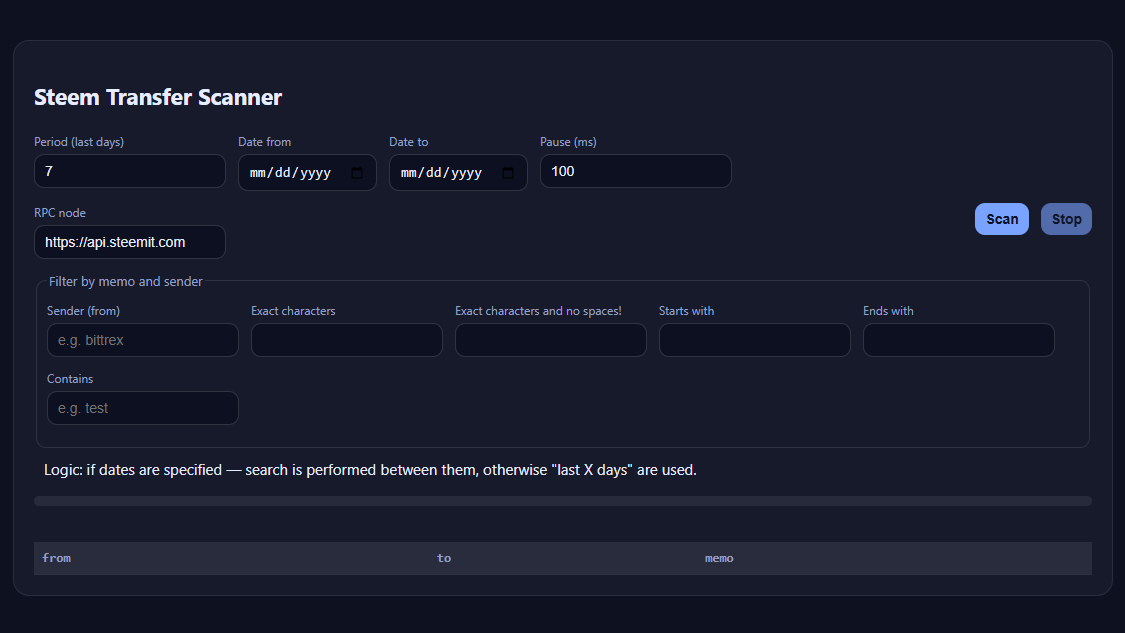
Interface. There are fields for selecting a range: you can specify how many recent days to check, or set exact “from” and “to” dates. You can also set a pause between requests in milliseconds to avoid DDoSing the node. It’s also possible to change the RPC node - by default it’s https://api.steemit.com, but if it’s slow, you can use another one.
Filter. Here you can fine-tune everything for your needs. You can filter by sender (from), by memo length, by the presence of spaces, by what the text starts or ends with, or by containing a specific substring. For example, you can search for all memos containing the word “test” or those with an exact length of 10 characters. This is convenient if, say, you’re looking for automated transfers with short codes.
Below the filters there’s an explanation that if no dates are specified, the “last X days” option is used. Below that there’s a progress bar showing how many blocks have already been scanned, and a table where the found transfers appear. The table is simple: three columns - “from,” “to,” and “memo.”
Now to the JavaScript itself. The main logic revolves around asynchronous functions that make RPC requests. There are three key functions:
get_dynamic_global_properties- retrieves the current network parameters to find out the number of the latest block and the current time.get_block_header- returns the header for a given block number, which contains the block’s timestamp. This is needed to determine which block corresponds to a specific date.get_ops_in_block- this function returns all operations in a block, and from them it filters those that are “transfer” operations.
The whole script constructs a range of blocks corresponding to the selected time period. It uses binary search by dates - a pretty clever solution, since there are many blocks in Steem, and without it, you’d be waiting forever. Once the range boundaries are found, the script goes through the blocks sequentially, calls get_ops_in_block, checks each operation, and if it’s a transfer, compares the “from” and “memo” fields with the filters. If they match - it adds a row to the table.
There’s error handling so it doesn’t crash if the RPC returns nonsense. There’s also a “Stop” button so you can halt the process if it takes too long. Progress updates every 200 blocks - it shows the percentage and how many matches were found.
It’s a tool for those who want a lightweight, standalone scanner at hand. The only downside: it scans slowly, especially if a delay in milliseconds is set.
Full code:
<!doctype html>
<html lang="en">
<head>
  <meta charset="utf-8" />
  <meta name="viewport" content="width=device-width,initial-scale=1" />
  <title>Steem Memo Scanner (extended filter + dates + pause)</title>
  <style>
    :root { --bg:#0e111f; --card:#161a2b; --ink:#e7ecff; --muted:#96a0c6; --accent:#7aa2ff; --ok:#8affc1; }
    body { background:var(--bg); color:var(--ink); font:15px/1.5 system-ui,-apple-system,Segoe UI,Roboto; margin:0; }
    .wrap { max-width:1100px; margin:40px auto; padding:0 16px; }
    .card { background:var(--card); border:1px solid rgba(255,255,255,.08); border-radius:16px; padding:20px; }
    input,button { background:#0c1020; color:var(--ink); border:1px solid rgba(255,255,255,.15); border-radius:10px; padding:8px 10px; font-size:14px; }
    input:focus { border-color:var(--accent); outline:none; }
    button { cursor:pointer; background:var(--accent); color:#0b1224; border:none; font-weight:600; }
    button[disabled]{opacity:.6; cursor:not-allowed;}
    label { display:block; font-size:12px; color:var(--muted); margin-bottom:4px; }
    .row { display:flex; gap:12px; flex-wrap:wrap; margin-bottom:12px; }
    table { width:100%; border-collapse:collapse; margin-top:16px; font-family:ui-monospace,monospace; font-size:13px; }
    th,td { border-bottom:1px solid rgba(255,255,255,.1); padding:6px 8px; text-align:left; }
    th { color:var(--muted); font-weight:600; background:rgba(255,255,255,.05); }
    tr:nth-child(odd){ background:rgba(255,255,255,.03); }
    .progress { font-size:13px; color:var(--muted); margin-top:6px; }
    .bar { height:10px; background:rgba(255,255,255,.07); border-radius:6px; overflow:hidden; margin-top:4px; }
    .bar-inner { height:100%; background:var(--accent); width:0%; transition:width .2s linear; }
    .substatus { font-size:12px; color:var(--muted); margin-top:4px; min-height:16px; }
    fieldset { border:1px solid rgba(255,255,255,.1); border-radius:10px; padding:10px; margin-top:12px; }
    legend { font-size:13px; color:var(--muted); }
  </style>
</head>
<body>
<div class="wrap">
  <div class="card">
    <h2>Steem Transfer Scanner</h2>

    <div class="row">
      <div><label>Period (last days)</label><input id="days" type="number" min="1" value="7"></div>
      <div><label>Date from</label><input id="dateFrom" type="date"></div>
      <div><label>Date to</label><input id="dateTo" type="date"></div>
      <div><label>Pause (ms)</label><input id="delay" type="number" min="0" value="100"></div>
    </div>

    <div class="row">
      <div style="flex:1;min-width:260px">
        <label>RPC node</label>
        <input id="endpoint" value="https://api.steemit.com">
      </div>
      <div><button id="run">Scan</button></div>
      <div><button id="stop" disabled>Stop</button></div>
    </div>

    <fieldset>
      <legend>Filter by memo and sender</legend>
      <div class="row">
        <div><label>Sender (from)</label><input id="fromFilter" placeholder="e.g. bittrex"></div>
        <div><label>Exact characters</label><input id="lenExact" type="number" min="0"></div>
        <div><label>Exact characters and no spaces!</label><input id="lenNoSpace" type="number" min="0"></div>
        <div><label>Starts with</label><input id="startsWith"></div>
        <div><label>Ends with</label><input id="endsWith" placeholder=""></div>
        <div style="flex:1"><label>Contains</label><input id="contains" placeholder="e.g. test"></div>
      </div>
    </fieldset>

    <div style="padding: 10px;">Logic: if dates are specified — search is performed between them, otherwise "last X days" are used.</div>

    <div class="progress" id="progress"></div>
    <div class="bar"><div class="bar-inner" id="barInner"></div></div>
    <div class="substatus" id="substatus"></div>

    <table id="table">
      <thead><tr><th>from</th><th>to</th><th>memo</th></tr></thead>
      <tbody></tbody>
    </table>
  </div>
</div>

<script>
function sleep(ms){ return new Promise(r=>setTimeout(r,ms)); }

const $=s=>document.querySelector(s);
const daysEl=$('#days'), endpointEl=$('#endpoint'), runBtn=$('#run'), stopBtn=$('#stop'),
progressEl=$('#progress'), barInner=$('#barInner'), substatus=$('#substatus'), tbody=$('#table tbody');
const lenExactEl=$('#lenExact'), lenNoSpaceEl=$('#lenNoSpace'),
startsEl=$('#startsWith'), endsEl=$('#endsWith'), containsEl=$('#contains');
const dateFromEl=$('#dateFrom'), dateToEl=$('#dateTo'), delayEl=$('#delay');
const fromFilterEl=$('#fromFilter');

let stop=false;

async function rpc(url,method,params){
  const res=await fetch(url,{method:'POST',headers:{'Content-Type':'application/json'},
    body:JSON.stringify({jsonrpc:'2.0',id:1,method,params})});
  const j=await res.json();
  if(j.error) throw new Error(j.error.message);
  return j.result;
}
async function getDGPO(ep){return rpc(ep,'condenser_api.get_dynamic_global_properties',[]);}
async function getHeader(ep,b){return rpc(ep,'condenser_api.get_block_header',[b]);}
async function getOps(ep,b){return rpc(ep,'condenser_api.get_ops_in_block',[b,false]);}

function transferMatch(from,memo){
  const fromFilter = fromFilterEl.value.trim().toLowerCase();
  if(fromFilter && from.toLowerCase() !== fromFilter) return false;

  if(typeof memo!=='string')return false;
  const s=memo.trim();
  const lenExact=parseInt(lenExactEl.value)||0;
  const lenNoSpace=parseInt(lenNoSpaceEl.value)||0;
  const starts=startsEl.value||'';
  const ends=endsEl.value||'';
  const contains=containsEl.value||'';

  if(lenExact>0 && s.length!==lenExact) return false;
  if(lenNoSpace > 0 && (/\s/.test(s) || s.length !== lenNoSpace)) return false;
  if(starts && !s.startsWith(starts)) return false;
  if(ends && !s.endsWith(ends)) return false;
  if(contains && !s.includes(contains)) return false;

  return true;
}

function addRow(from,to,memo){
  const tr=document.createElement('tr');
  tr.innerHTML=`<td>${from}</td><td>${to}</td><td>${memo}</td>`;
  tbody.appendChild(tr);
}

async function scan(){
  stop=false; tbody.innerHTML='';
  runBtn.disabled=true; stopBtn.disabled=false;
  barInner.style.width='0%';
  substatus.textContent='';
  try{
    const ep=endpointEl.value.trim();
    const delay=parseInt(delayEl.value)||0;
    const days=parseInt(daysEl.value)||1;
    const dateFrom=dateFromEl.value? new Date(dateFromEl.value+'T00:00:00Z'):null;
    const dateTo=dateToEl.value? new Date(dateToEl.value+'T23:59:59Z'):null;

    progressEl.textContent='Loading network parameters...';
    const g=await getDGPO(ep);
    const head=g.head_block_number;
    const headTime=new Date(g.time+'Z');

    let targetStart, targetEnd;
    if(dateFrom && dateTo){
      targetStart=dateFrom; targetEnd=dateTo;
    }else{
      targetEnd=headTime;
      targetStart=new Date(headTime - days*24*60*60*1000);
    }

    // find start block of range
    let lo=1, hi=head, bestStart=head;
    for(let i=0;i<25;i++){
      const mid=Math.floor((lo+hi)/2);
      const hdr=await getHeader(ep,mid);
      const t=new Date(hdr.timestamp+'Z');
      if(t>=targetStart){bestStart=mid;hi=mid-1;} else lo=mid+1;
    }
    // find end block of range
    lo=bestStart; hi=head; let bestEnd=head;
    for(let i=0;i<25;i++){
      const mid=Math.floor((lo+hi)/2);
      const hdr=await getHeader(ep,mid);
      const t=new Date(hdr.timestamp+'Z');
      if(t<=targetEnd){bestEnd=mid;lo=mid+1;} else hi=mid-1;
    }

    const total=bestEnd-bestStart;
    let count=0, found=0;
    progressEl.textContent=`Scanning ${bestStart}..${bestEnd} (${total.toLocaleString()} blocks)`;

    for(let b=bestStart;b<=bestEnd && !stop;b++){
      let ops;
      try{ ops=await getOps(ep,b);}catch{continue;}
      for(const o of ops){
        if(o.op && o.op[0]==='transfer'){
          const {from,to,memo}=o.op[1];
          if(transferMatch(from,memo)){
            addRow(from,to,memo.trim());
            found++;
          }
        }
      }
      count++;
      if(count%200===0 || b===bestEnd){
        const pct=Math.min(100,(count/total*100).toFixed(1));
        barInner.style.width=pct+'%';
        progressEl.textContent=`Processed ${count.toLocaleString()} / ${total.toLocaleString()} blocks, found ${found}`;
      }
      await sleep(delay);
    }
    barInner.style.width='100%';
    substatus.style.color=stop?'#ff9090': 'var(--ok)';
    substatus.textContent=stop?'Search stopped.':'Search completed.';
  }catch(e){
    progressEl.textContent='Error: '+e.message;
    substatus.style.color='#ff9090';
    substatus.textContent='Search aborted due to error.';
  }finally{
    runBtn.disabled=false; stopBtn.disabled=true;
  }
}

runBtn.onclick=scan;
stopBtn.onclick=()=>stop=true;
</script>
</body>
</html>