Neues Tool: Quelltext eines Beitrags anzeigen
Manchmal sind in Beiträgen Formatierungen zu sehen, bei denen man sich fragt, wie es gemacht wurde. Doch wie kommt man an den Quelltext?
Ja, vor einiger Zeit gab es bereits Tool mit dem das ging, steemblockexplorer.com von @penguinpablo, doch das funktioniert nicht mehr. Also habe ich eines gebastelt, mit dem das einfach geht.
Hier der Link zum Tool: Plain text from a Steemit post
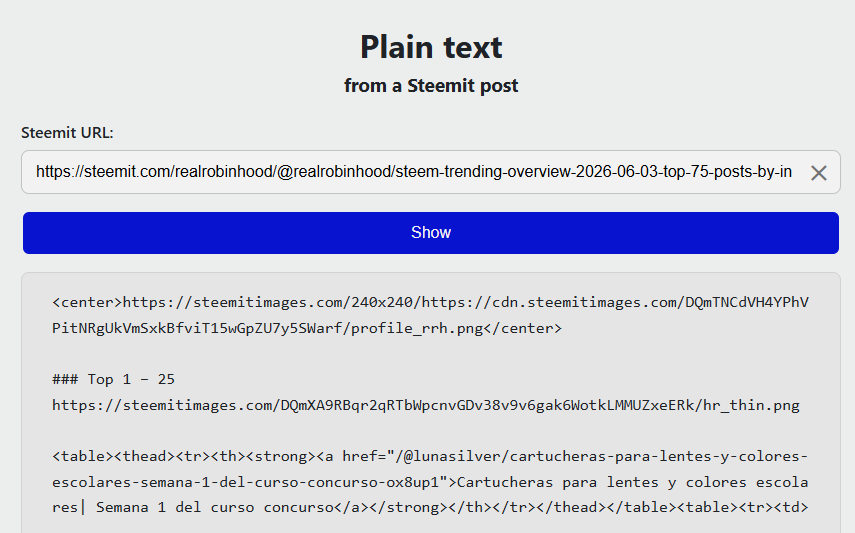
Um sich den Quelltext anzeigen zu lassen, einfach die URL des Posts im Feld "Steemit URL" einfügen. Wobei die URL nicht zwingend von steemit sein muss, URL's von anderen Frontends wie z.B. steemit.moecki.online oder steempro.com funktionieren genauso.
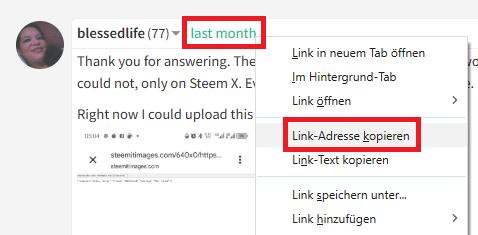
Und es geht auch mit Kommentaren. Der Link zum Kommentar kann z.B. mit Rechtsklick auf die Zeitangabe in die Zwischenablage kopiert werden:
So, das war's auch schon! In der Kürze liegt die Würze, sagt man :-)
Hi, @michelangelo3,
If you simply want to find the raw data, you can try our explorer:
https://ecosynthesizer.com/steem/@michelangelo3
Ah, you’ve hidden the feature here ;-)
Thanks for the hint, I was actually using the previous version, where the raw data was displayed in this format:
ecosynthesizer.com/steem/@user/permlink.Hi @symbionts
I can't find the source code view option.
Where it is?
Click on the transaction opens the expanded transaction view as showed in the pic.
Ok. Thanks a lot.
First of all, I would like to thank you for presenting such a wonderful tool to us. If I talk about my personal opinion, I must say that I have been looking for it for a long time and since I am a curator, sometimes I need some things that I try to use, but I cannot find them. However, by using your tool, I can see it very well and I have checked it with my own post.
The way I have used the text starting from Markdown, everything is shown here. It will be very useful for me. I hope that other people who will use it will also be able to experience a lot and I think that those who are new can take Markdown from the posts of the experienced. However, in the end, I have to say one thing. I am very happy to have such a wonderful tool and I have seen the full result of using it, which I like very much. Thank you for presenting such a wonderful tool to us.
Now here I want to show you a problem
When I see the post here with a link, then after a while or two or three seconds after going to another tab, when I come back here, such a text appears
I want to give you a suggestion, if you add a copy button at the top or bottom, then the whole thing will be copied with one click, I think it will be more useful.
I'm glad the tool is useful to you.
Regarding the first point: I only get the message when I manually refresh the page. It seems you have something like auto-refresh enabled. I’ll change the method from ‘post’ to ‘get’, then the message shouldn’t appear anymore.
Point two: Interesting, I haven’t needed that so far. Am I right in understanding that a ‘Copy’ button should be displayed, which copies the displayed source code from the post to the clipboard?
I’ll be back at my PC in about 12 hours, then I’ll add your suggestions.
Thanks for your feedback!
It's great to see that the first thing I shared caught your attention. Actually, this doesn't happen with any other website. Only here, when enter it, an interface like this comes up. It would be great if it was fixed.
The second suggestion I gave you is to add a copy button. You got it right.
I mean, I think it's a bit of a hassle to select it once and copy it again later. And if it's a code system. If there is only one copy button at the top, it will be copied completely. If there is such a facility, I think everyone will save time and the source code will be able to be downloaded in a very short time.
Anyway, I hope to see you again in 12 hours. It's already night here too. See you in 12 hours.
Goodbye.
That message shouldn't appear anymore, and the copy button should show up after you click “Show.”
I'm curious—why do you need the entire code for a page? As I mentioned before, I haven't needed that yet; I've only needed specific parts when I wanted to remember a particular formatting style.
Thank you very much for bringing this copy button according to my suggestion.
It is very good to see your interest in knowing. In fact, I find it easier when I copy the entire post and preview it, then I take the code that I like.
You take the code you need from the post. However, I find it easier when I copy the entire post and put it in my notes. After that, I find the code I need.
Anyway, finally, I wish you all the best for presenting such a wonderful website to us. I hope to see more new things from you in the future.
Ah, OK, I had a feeling that might be the case. It’s not that easy to find specific sections on a mobile phone either; it’s easier in a notes app.
Thanks for clearing that up.
Yes. You understood correctly. Actually, finding and copying a specific code from a mobile is a very troublesome task. So I copy the whole thing and get the code I need.
Apart from this, I like another thing here that after giving any kind of link, the post can be seen. This will be very good for everyone who posts here using different types of websites.
Thanks for ur vote on my post, with ur support and help hope to go far on steemit,since am new at steemit there is ot of things I still need to learn
You're welcome, and welcome to Steemit. As I can see, Germansailor has already delegated to you, so you shouldn't have any more RC issues.
Good luck and best wishes from Bavaria.
Thanks your kind words, want to ask how can I boost my post to earn better and how can I use the RC
RCs are required for all transactions, like posting, commenting, etc. – it all happens automatically, so you don’t need to do anything.
To earn more, you’ll need patience above all else. You’re still new here and not many people know you yet. That takes time.
And I think you’re already doing it right – you’re writing comments! In my view, that’s one of the most important things for getting to know other people here and drawing attention to yourself. Honest comments, not just gushing about how great a post is, but simply showing genuine interest. Then it’ll work out, and with time you’ll not only have more fun but also earn more rewards.
I appreciate ur time and mentorship for to grow on steemit with ur continued support I will surely excel here