SteemSearch Update v1.4.1
[DE] Please scroll down for English version
Bisher gab es keine Möglichkeit, gezielt nach Kommentaren zu suchen, die man an einen bestimmten User geschrieben hat. Je mehr Kommentare man hat und je länger diese zurückliegen, desto schwieriger, wenn nicht sogar unmöglich wird es.
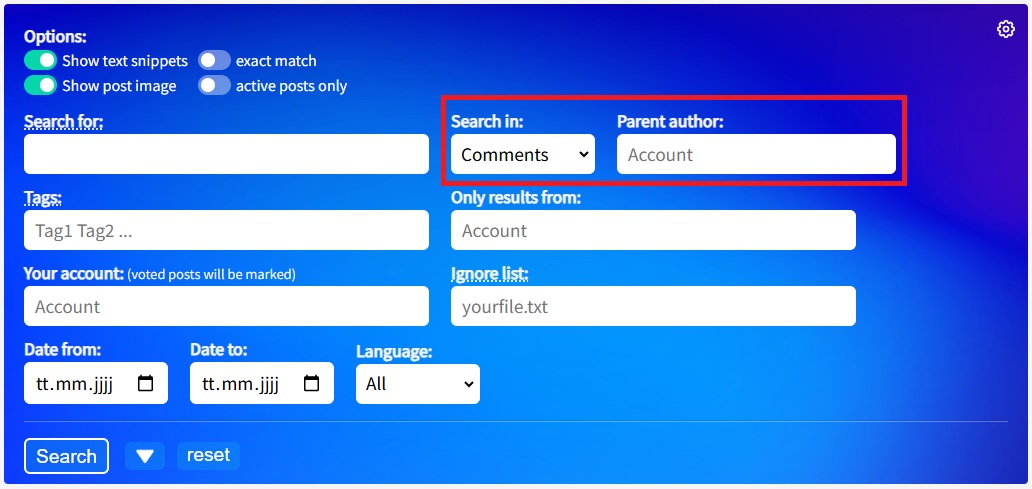
Daher habe ich in v1.4.1 für die Suche nach Kommentaren das neue Feld "Parent author" eingebaut, das ist der Autor des übergeordneten Kommentars bzw. Beitrags. Ja, vielleicht muss man ein bisschen um die Ecke denken, aber wenn ich bei User xy kommentiere, dann ist xy der Parent Autor meines Kommentars.
Kommentare an einen bestimmten User finden
Möchtest du nach Kommentaren suchen, die du an einen bestimmten User geschrieben hast, wähle zuerst bei “Search in" den Punkt “Comments”, das Feld “Parent author” wird dann eingeblendet. Jetzt kannst du bei "Only results from" deinen Account und bei "Parent author" den anderen Account eingeben.
Kurz:
- Search in: Comments
- Only results from: dein Account
- Parent author: der Account, bei dem du kommentiert hast
Replies von einem bestimmten User finden
Natürlich funktioniert das Ganze auch umgekehrt! Wenn du nach Replies suchen möchtest, bist du der “Parent author” und der User, der den Reply geschrieben hat, kommt bei "Only results from" rein.
- Search in: Comments
- Only results from: der Account, von dem der Reply stammt
- Parent author: dein Account
Hinweis
Sofern kein Suchbegriff oder sonstige Kriterien angegeben sind, holt sich die Suche jeweils 750 Kommentare und filtert anschließend diejenigen des Parent Autors heraus. Hast du z.B. insgesamt 7500 Kommentare geschrieben, könnte es bis zu 10 Klicks brauchen, bis alle Kommentare durchsucht sind. Falls "Results 1 - 750 (750 ignored)" angezeigt wird, also einfach weiter klicken.
Updates nur noch am neuen Server
Wie ihr vielleicht hier bereits gelesen habt, ist SteemSearch auf einen neuen Server umgezogen und ist jetzt unter dieser URL erreichbar.
Falls ihr Lesezeichen auf den alten Server gesetzt habt, empfehle ich euch diese auf den neuen Server zu ändern. Ihr müsst dazu nur den Beginn der bisherigen URL https://steem.x10.mx durch https://steem.m3dev.noho.st ersetzen. Alles was danach kommt, bleibt gleich und funktioniert wie vorher.
Neue Felder zur Suche nach neuen Accounts
Im Beitrag Suche nach Newcomern habe ich euch die neuen Felder bereits vorgestellt. Damit das nicht untergeht, hier nochmal:
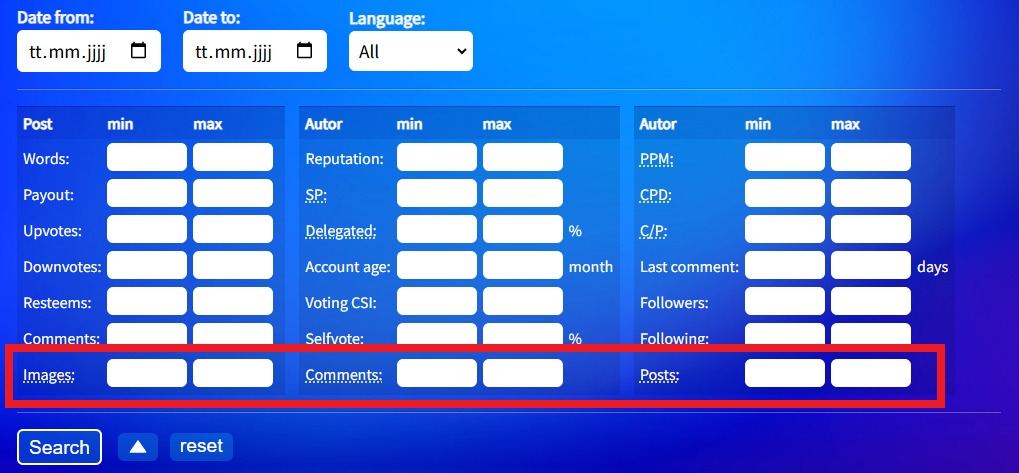
Mittlerweile habe ich festgestellt, der Link aus obigem Beitrag war etwas zu streng. In letzter Zeit suche ich lieber mit dieser Einstellung - könnt ihr gerne ausprobieren oder hat jemand eine bessere Einstellung gefunden?
Das war's, vorerst...
So, jetzt hoffe ich, der ein oder andere findet die neuen Optionen nützlich. Bei der Kommentarsuche muss ich sagen, es wundert mich ein bisschen, eigentlich hätte ich schon früher drauf kommen können :-)

[EN]
Note on translation: As I learned in this post, some users find an English translation useful. I first translate with DeepL and then adjust the result according to my own feeling. Well, I'm not sure if you'll be very happy with it, but I'm doing my best. If you find any horrible passages, it would be nice if you could let me know.
Until now, there was no way to search specifically for comments that you had written to a particular user. The more comments you have and the longer ago they were written, the more difficult, if not impossible, it becomes.
That's why I added the new field “Parent author” in v1.4.1 for searching comments. This is the author of the parent comment or post. Yes, you may have to think outside the box a little, but if I comment on user xy, then xy is the parent author of my comment.
Find comments to a specific user
If you want to search for comments you have written to a specific user, first select “Comments” under “Search in.” The “Parent author” field will then appear. Now you can enter your account under “Only results from” and the other account under “Parent author.”
In short:
- Search in: Comments
- Only results from: your account
- Parent author: the account you commented on
Find replies from a specific user
Of course, the whole thing also works the other way around! If you want to search for replies, you are the “parent author” and the user who wrote the reply must be entered under “Only results from.”
- Search in: Comments
- Only results from: the author of the reply
- Parent author: your account
Note
If nothing is specified under “Search for” and no other criteria are given, the search will fetch 750 comments and then filter out those from the parent author. For example, if you have written a total of 7500 comments, it could take up to 10 clicks to search through all comments. If “Results 1 - 750 (750 ignored)” is displayed, simply click the right arrow.
Updates only on the new server
As you may have already read here, SteemSearch has moved to a new server and is now available at this URL.
If you have bookmarked the old server, I recommend changing it to the new server. To do this, simply replace the beginning of the old URL https://steem.x10.mx with https://steem.m3dev.noho.st. Everything after that remains the same and works as before.
New fields for searching for new accounts
In the post Searching for newcomers, I already introduced you to the following new fields. So that it doesn't get lost, here it is again:
I realized that the link from the above post was a little too strict. Lately, I've been preferring to search with this setting - feel free to try it out, or has anyone found a better setting?
That's it for now...
I hope some of you find the new options useful. As for the comment search, I have to say I'm a little surprised myself that I didn't think of it sooner :-)
Danke für das neue Update!
Herrje, nur Vote-Kommentare unter dem Post...
Dann mache ich mal den Anfang. ;-)
Ich habe die Funktion tatsächlich mehrmals schon benötigt... und irgendwie auch hinbekommen. Ich kann dir gar nicht mehr sagen, wie ich das letztlich gemacht hatte. Wahrscheinlich indem ich alle Kommentare durchgegangen bin.
Deine neue Domain sieht ja spannend aus. Was ist "st" denn für eine TLD? Ich ändere gleich mal meine Bookmarks.
Ach, ich bin selber Comment-Faul geworden, geht mir speziell bei längeren Beiträgen oft so, da fällt mir spontan nix ein und dann lass ich es lieber.
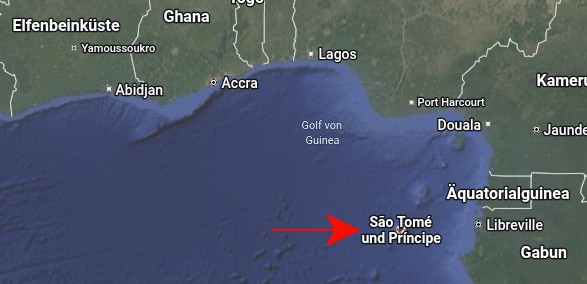
Oh, lange her... ach ja: São Tomé
Die Domain stammt von Yunohost , die bekommt man bei der Installation mit dazu - noho.st heißt soviel wie no host :-)
🎉 Congratulations, @michelangelo3!
Your post SteemSearch Update v1.4.1 was rewarded by CCS Curation Trail
“Home is where your heart is ❤️.”
👉 Join the CCS Curation Trail | Community Invitation
✅ Vote for visionaer3003 as witness
Hi Friend,
Your post have been rewarded by the Speak on Steem curator team!
You have received special support because you (or someone on your behalf) sent SBD to @null to promote your post.
You can now promote your posts on Speak on Steem to increase their visibility and potential rewards.
Learn more here:
Congratulations!
Your post has been manually upvoted by the SteemPro team! 🚀
This is an automated message.
If you wish to stop receiving these replies, simply reply to this comment with turn-off
Visit here.
https://www.steempro.com
SteemPro Official Discord Server
https://discord.gg/Bsf98vMg6U
💪 Let's strengthen the Steem ecosystem together!
🟩 Vote for witness faisalamin
https://steemitwallet.com/~witnesses
https://www.steempro.com/witnesses#faisalamin