SLC S22 Week6 || Java Graphical Programming with Swing

Hello Steemians!
Welcome to the sixth week of the Steemit Learning Challenge Season 22, where I explore the essential and exciting topic of Graphical Programming with Swing. Swing is a powerful graphical library included in Java for creating rich and interactive user interfaces. Mastering Swing will enable me to design visually appealing and functional applications.
This week, I will cover the basics of Swing, its essential components, and common techniques for designing graphical applications. Let's dive into the world of graphical programming and create something amazing!

Introduction
Swing is a versatile library in Java used to build graphical user interfaces (GUIs). It offers a wide range of components and layout managers to create responsive and interactive applications. By understanding the core concepts of Swing, I can develop applications that are both visually appealing and user-friendly.
Basic Concepts
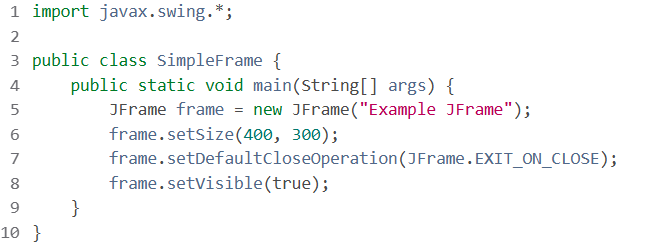
1. What is a JFrame?
A JFrame is the main window in a Swing application. It serves as a top-level container for other graphical components.
Example:
2. Layout Management
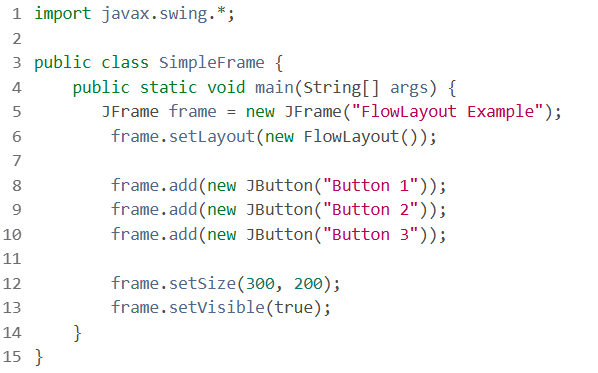
Swing uses layout managers like BorderLayout, FlowLayout, and GridLayout to organize components within a window.
Example with FlowLayout:
3. Event Handling
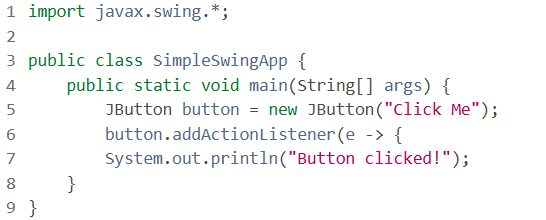
Swing uses the Observer pattern for event handling, where a component sends events to registered listeners.
Example of an Action Listener:
Essential Components
1. Labels (``)
Labels display non-editable text or icons.
Example:
JLabel label = new JLabel("Hello, Swing!");
label.setHorizontalAlignment(SwingConstants.CENTER);
frame.add(label);
2. Text Fields (``)
Text fields allow users to input a single line of text.
Example:
JTextField textField = new JTextField(20);
textField.setText("Initial Text");
frame.add(textField);
3. Text Areas (``)
Text areas allow multi-line text input.
Example:
JTextArea textArea = new JTextArea("Initial Text", 5, 20);
frame.add(new JScrollPane(textArea));
4. Buttons (``)
Buttons trigger actions when clicked.
Example:
JButton button = new JButton("Submit");
button.addActionListener(e -> {
    System.out.println("Action performed");
});
frame.add(button);
5. Tables (``)
A JTable is used to display tabular data.
Example:
String[] columns = {"Name", "Age", "City"};
Object[][] data = {
    {"kouba01", 40, "Tunis"},
    {"Iskander", 23, "London"},
    {"Yahya", 10, "Paris"}
};
JTable table = new JTable(data, columns);
frame.add(new JScrollPane(table));
Homework Tasks
Exercise 1: Example of JFrame
- Write a class
SimpleFramethat displays a window. Assign it a title and a minimum size. - Change the default behavior of the window on close so that the application exits.
- Add a label to the window, representing a short text. Retrieve the container corresponding to the client area of the window using the
getContentPanemethod and add the label to this container. - Center the text of the label using the
setHorizontalAlignmentmethod. - The component placement algorithm for a
JFrameis managed by theBorderLayoutclass. By carefully reading the description of theadd(Component, Object)method of theContainerclass, add an "OK" button below the label.
Exercise 2: Discovering New Components
- Create a new
JFramenamed "Discovery" and include the following components:- A button
- A text field
- A text area
- Add a tooltip (using
setToolTipText()) to the button. Make the button non-functional and change its text and background colors. - Add text to the text field and the text area. Make the text field non-editable.
- Add a border to the text field by providing a
javax.swing.border.Borderobject created using a method from thejavax.swing.BorderFactoryclass, such as thecreateLineBorder(Color color, int thickness)method.
Exercise 3: Associating Actions with Buttons
The goal is to create a window with a button labeled "Test" that, when clicked, displays "Test click" on the standard output.
- Create the window and the button.
- Create an anonymous class implementing the
ActionListenerinterface, displaying the message in the appropriate method. - Attach the listener to the button using the dedicated button method.
- Use the same technique with three buttons labeled "One," "Two," and "Three," which change the title of the main application window to "One," "Two," and "Three" respectively. Produce code that allows additional buttons to be added easily.
Exercise 3bis: Associating Actions with Buttons
Redo Exercise 3, but use the AbstractAction class instead of the ActionListener interface.
Exercise 4: Event Listeners
- Create a window containing a button titled "Add." Each click on this button should add a numbered button to the window. When any of the added buttons is clicked, it disappears.
- Add a "Reset" button (next to "Add") that removes all added buttons.
Exercise 5: Factorial
Write a program to compute the factorial of an integer entered in a text field. If the integer is 17 or greater, prompt the user to re-enter the value with an appropriate dialog message. Display the result in a label after clicking a button whose label updates to "5!" if 5 is entered.
Exercise 6: What is Your Age?
I. GUI Mockup
Design the following layout by considering the panels and layout managers required. The three white text fields should be editable, while the blue one should not. Your source files should be in a package named ageIHM.
II. Event Handlers
Add event handlers for the buttons. Your source files should be in a package named calculage.
- "Age?" Button: Calculates the age and displays it in the blue text field.
- "Reverse" Button: Performs a reversal operation.
Hint:
- To calculate the age, retrieve the current year using the following:
Calendar cal = Calendar.getInstance(); int year = cal.get(Calendar.YEAR); - Use
Integer.parseInt(String s)to convert a numeric string to an integer.
Exercise 7: JTable Component
- Write a
Studentclass withnameandfirstNameas string attributes. - Write a
StudentLanguageclass with attributes: aStudentobject and a string representing the student's favorite programming language (e.g., C, C++, Java, etc.). - Write a
LanguageServiceclass implementing the Singleton design pattern. This class should provide a method that returns the list of students' favorite languages (List<StudentLanguage>). The students and their favorite programming languages should be hardcoded in the program. - Write a
LanguageModelclass, a subclass ofAbstractTableModel. This "Table Model" is linked to the data table to be displayed. The table headers are the student's name, first name, and favorite language. TheLanguageModelclass has three attributes:headers: an array of strings for the table headerslanguageService: aLanguageServiceobjectstudentLanguages: aList<StudentLanguage>object
Write a method to retrieve this list and implement the following methods:getColumnCountgetColumnNamegetRowCountgetValueAtgetColumnClass
- Create a GUI application to display the data table in a
JTable. - Sort the data alphabetically by favorite language.
- Display the favorite language "Java" in red and the others in blue.
Contest Guidelines
Title: SLC S22 Week6 || Java Graphical Programming with Swing
Use the tags: #dynamicdevs-s22w6, #country (e.g., #tunisia), #steemexclusive.
Submission Period:
- Monday, January 20, 2025, 00:00 UTC to Sunday, January 26, 2025, 23:59 UTC.
Eligibility:
- Posts must be #steemexclusive.
- Plagiarism and AI-generated content are strictly prohibited.
- Include original or copyright-free images with proper attribution.
Rewards
SC01/SC02 would be checking on the entire 15 participating Teaching Teams and Challengers and upvoting outstanding content. Upvote is not guaranteed for all articles. Kindly take note.
At the end of the week, we would nominate the top 4 users who had performed well in the contest and would be eligible for votes from SC01/SC02.
Important Notice: The selection of the four would be based solely on the quality of their post. Number of comments is no longer a factor to be considered.
Best Regards,
Dynamic Devs Team
You've got a free upvote from witness fuli.
Peace & Love!
Here is my entry: https://steemit.com/dynamicdevs-s22w6/@mohammadfaisal/slc-s22-week6-or-or-java-graphical-programming-with-swing
https://steemit.com/hive-145157/@sergeyk/slc-s22-week6-java-graphical