Best free wordpress hosting for testing in 2026
Testing a WordPress website does not always require buying another hosting plan. If you are experimenting with a theme, checking a plugin, learning WordPress, building a demo website, or trying custom code, a free hosting environment can give you a separate place to work without putting an important live website at risk.
The challenge is that not every free hosting service gives you the same level of WordPress access. Some provide a traditional hosting environment with databases, FTP, SSL, and plugin installation, while others are better suited to testing page layouts and content.
For anyone looking for free WordPress hosting for testing in 2026, GoogieHost, WordPress.com, and x10Hosting are three options worth knowing about. However, each serves a different type of user.
Best Free WordPress Hosting for Testing: Quick Comparison
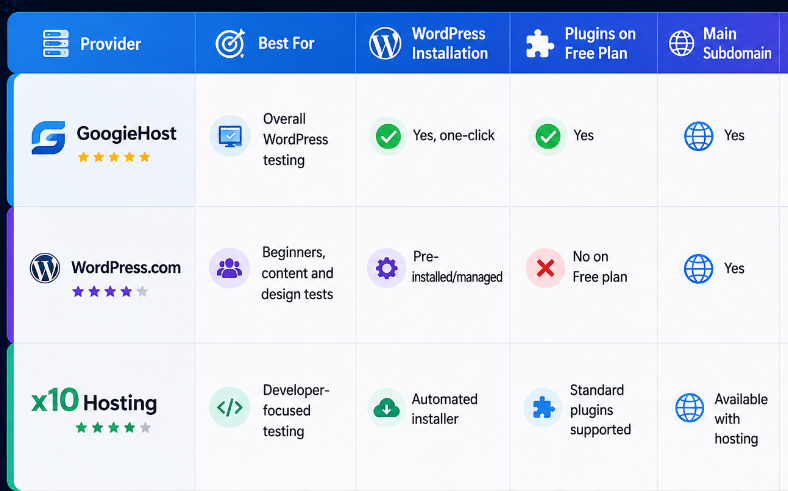
For users who specifically want to test WordPress plugins, themes, files, or development changes on an online server, GoogieHost currently offers the most complete testing environment of these three.
- GoogieHost – Best Overall Free WordPress Hosting for Testing
GoogieHost takes the first position because its free plan works more like traditional web hosting than a limited website-building platform.
Try googiehost free wordpress hosting here: https://googiehost.com/freewordpresshosting
Its current free hosting package includes 1,000 MB NVMe SSD storage, DirectAdmin, a free SSL certificate, a free subdomain, one MySQL database, an FTP account, and one-click WordPress installation. The plan does not require a credit card and is advertised without an expiry period as long as the account remains in good standing.
These features make it particularly useful for WordPress testing.
Why GoogieHost Works Well for Testing
A useful WordPress test environment should allow you to interact with more than the page editor.
GoogieHost gives users access to hosting-level features such as DirectAdmin, databases, and FTP. This means it can be used for tasks such as:
Installing and testing WordPress plugins
Trying different themes
Uploading custom themes or plugins
Modifying WordPress files
Testing CSS changes
Experimenting with PHP
Creating temporary development websites
Building client demonstrations
Learning how self-hosted WordPress works
GoogieHost also states that users can install plugins and themes from the WordPress repository or upload their own versions on its free WordPress hosting.
That is important because plugin and theme access is one of the biggest differences between a proper WordPress testing environment and a limited free website builder.
Free Subdomain for Test Websites
Buying a domain solely to test a WordPress installation usually makes little sense.
GoogieHost includes a free subdomain, allowing users to create an online test website without registering a separate domain.
A subdomain can work well for:
Development experiments
Portfolio drafts
College projects
Theme demonstrations
Plugin testing
Temporary client previews
If the project becomes permanent later, a registered custom domain can be connected.
One-Click WordPress Installation
Manually setting up WordPress involves creating a database, uploading files, configuring WordPress, and completing the installation process.
GoogieHost provides a one-click application installer for WordPress, reducing the number of technical steps required to get a test site running.
For beginners, this makes it easier to focus on learning or testing rather than server configuration.
Where GoogieHost Has Limits
Free hosting still has resource limits.
The free plan currently provides 1,000 MB of NVMe SSD storage. This is enough for many lightweight testing projects but is not designed to replicate a large production website with thousands of images, heavy plugins, or substantial traffic.
GoogieHost therefore makes the most sense for development, experimentation, learning, plugin testing, theme testing, and small demonstration websites rather than resource-intensive production projects.
- WordPress.com – Best for Beginners and Basic WordPress Testing
WordPress.com provides another way to create a WordPress website without purchasing separate hosting.
The main difference is that WordPress.com is a managed platform. Users do not need to install WordPress manually or manage databases and server configurations themselves.
As of August 2026, the WordPress.com Free plan includes WordPress hosting, automatic WordPress updates, unlimited pages and posts, unlimited users, basic traffic statistics, and 1 GB of media storage. It also includes themes, patterns, responsive editing features, and built-in revision history.
What Can You Test on WordPress.com for Free?
The free plan can work well for:
Learning the WordPress editor
Creating pages and posts
Testing content structures
Trying available themes
Working with Gutenberg blocks
Experimenting with navigation
Building simple demo websites
Checking responsive layouts
Learning basic WordPress site management
This makes WordPress.com attractive to someone who has never used WordPress before and wants to explore how the platform works.
The Biggest Limitation: Plugin Testing
WordPress.com Free is less suitable if your definition of testing involves third-party plugins, uploaded themes, server files, or deeper development work.
WordPress.com's current plan documentation lists plugin installation and theme uploads beginning with its paid Personal plan rather than the Free plan.
The platform also states that Free sites have restrictions on the custom code that can be added.
Therefore, WordPress.com should not be treated as a direct equivalent to traditional free WordPress hosting.
If your objective is:
“I want to understand WordPress, test layouts, and create sample pages.”
WordPress.com Free can work very well.
If your objective is:
“I want to upload plugins, modify PHP files, and test server configurations.”
A traditional hosting environment such as GoogieHost is a better fit.
- x10Hosting – Good for Developer Testing When Registration Is Available
x10Hosting has been a recognizable name in free web hosting for years and offers a more traditional hosting environment than WordPress.com.
Its platform supports WordPress and provides an automated script installer that can install WordPress in a few minutes. x10Hosting also advertises FTP access, MySQL database management through phpMyAdmin, DirectAdmin, and support for standard WordPress modules and plugins.
That combination makes x10Hosting relevant for developers who need an online environment for experimentation.
What Can x10Hosting Be Used to Test?
When the free plan is available, potential use cases include:
WordPress installations
WordPress plugins
Themes
PHP scripts
MySQL databases
Custom website files
Development concepts
Small demo websites
Its hosting environment provides considerably more technical flexibility than a restricted hosted website builder.
Important Availability Issue in 2026
There is currently one major reason x10Hosting ranks below the other two options.
As of August 25, 2026, the x10Hosting website states that new free web hosting sign-ups are currently unavailable because of scheduled maintenance and that the company expects to begin accepting users again.
That does not mean the free service has permanently ended. However, someone who needs a WordPress testing environment immediately cannot rely on x10Hosting until registrations reopen.
For that reason, it remains worth considering but is not currently the most practical first choice.
Free WordPress Hosting vs Localhost for Testing
Free online hosting is not the only way to create a WordPress test site.
Developers frequently use local environments such as Local, XAMPP, MAMP, or similar tools to run WordPress directly on their computers.
Both approaches serve different purposes.
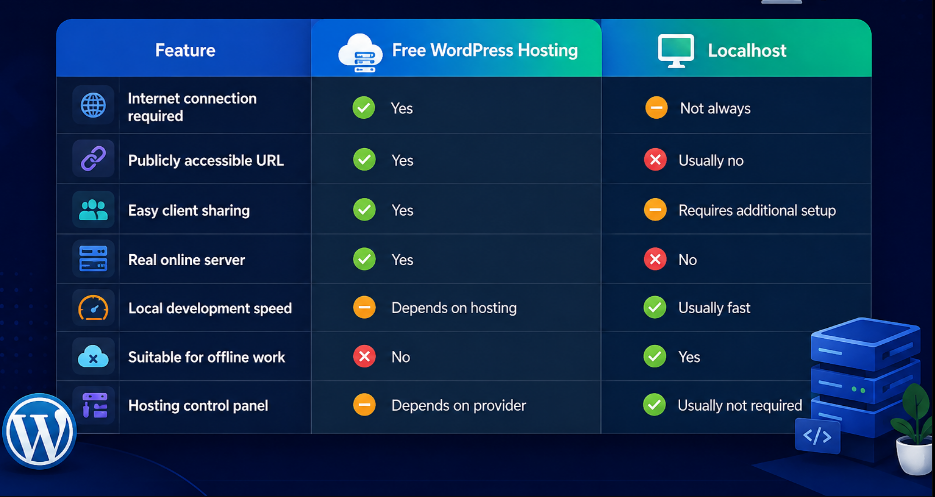
Choose Free WordPress Hosting When:
You need a website that can be accessed online.
This is particularly useful when:
A client needs to review the site
Multiple people need access
You want to test a site on an external server
You need a public demo
You want experience using a hosting control panel
Choose Localhost When:
Your main objective is development.
Localhost is often better for frequent coding changes, offline work, debugging, and projects that do not need a publicly accessible URL.
Many developers use both environments during different stages of development.
Free WordPress Hosting vs a Staging Environment
A testing website should also not automatically be confused with a staging website.
A true staging site is usually a duplicate or near-duplicate of an existing live website.
For example, a staging environment might use the same:
WordPress version
Theme
Plugins
Database
PHP version
Content
Server configuration
Custom code
This allows changes to be tested under conditions similar to production.
A free hosting environment may have different PHP configurations, resource limits, caching behavior, and server settings.
Therefore, free hosting is excellent for independent testing and learning but may not be appropriate for validating a major update to a business-critical website.
How to Choose Free WordPress Hosting for Testing
Before creating an account, identify exactly what you need to test.
- Check Plugin Access
If you need to test plugins, confirm that third-party plugin installation is supported.
This immediately makes some managed free WordPress platforms less suitable.
- Look for Database Access
Developers working with WordPress should consider whether MySQL or database management is available.
- Check File Access
FTP or a File Manager becomes important when testing custom files, themes, or code.
- Look for SSL
HTTPS can affect login behavior, redirects, cookies, APIs, and several WordPress plugins.
Testing with SSL produces a more realistic environment.
- Check Storage Limits
A basic theme test may require little storage, while a complete copy of an existing site may require several gigabytes.
- Look for a Free Subdomain
A free subdomain avoids purchasing a domain purely for development.
- Check Whether "Free" Means Free
Some hosting services advertise themselves as free but actually provide short trials that require payment details.
If the goal is genuinely cost-free testing, check for:
Credit-card requirements
Expiry dates
Renewal charges
Mandatory upgrades
Which Free WordPress Hosting Is Best for Testing in 2026?
The answer depends on what you want to test.
Choose GoogieHost If You Want:
Plugin installation
Theme uploads
FTP access
MySQL
DirectAdmin
SSL
A free subdomain
A more traditional self-hosted WordPress experience
For these reasons, GoogieHost is the strongest overall choice among these three for free WordPress hosting for testing.
Choose WordPress.com If You Want:
An easy WordPress introduction
Content testing
Gutenberg practice
Basic theme experimentation
A managed environment
Minimal technical setup
It is excellent for learning, but its Free plan is less appropriate for plugin and development testing.
Choose x10Hosting If You Want:
A conventional hosting environment
PHP and MySQL access
FTP
WordPress plugin support
Developer-oriented testing
The main drawback in August 2026 is that new free hosting registrations are temporarily unavailable.
Frequently Asked Questions
What is the best free WordPress hosting for testing?
For users who need plugin installation, theme access, DirectAdmin, FTP, MySQL, SSL, and an online WordPress installation, GoogieHost currently offers one of the more complete free testing environments among the three providers compared here.
Can I test WordPress plugins with free hosting?
Yes, if the hosting provider allows plugin installation. GoogieHost and x10Hosting state that WordPress plugins can be used on their hosting environments. WordPress.com Free is more restricted, with plugin installation listed as a paid-plan feature.
Do I need a domain for a WordPress test site?
No. A free subdomain is normally sufficient for learning, development experiments, and temporary demonstrations.
Is free WordPress hosting suitable for a live business site?
Free hosting is better treated as a testing, learning, or lightweight project environment. Business-critical websites generally need stronger resources, backups, support, security controls, and predictable performance.
Is free WordPress hosting better than localhost?
It depends on the use case. Free hosting is useful when the website must be publicly accessible, while localhost is usually better for fast, private development.
Final Verdict
Free WordPress hosting for testing can save money and reduce risk when you need a separate place to experiment with WordPress.
Among the three options, GoogieHost ranks first for 2026 because its free plan provides the combination of WordPress installation, plugin and theme access, DirectAdmin, MySQL, FTP, SSL, and a free subdomain needed for more realistic testing. WordPress.com is a strong choice for beginners learning WordPress and testing content or layouts, while x10Hosting offers useful developer features but currently has new free registrations temporarily paused.
The best option ultimately depends on whether you are testing content, WordPress functionality, or the underlying hosting environment.