Do This for Typing by Voice - Using Google Documents
Good afternoon stemians all wherever you are
hopefully in good health and in his protection
Children, adolescents and adults in modern times prefer typing rather than being asked to write. But, do you now GOOGLE DOCUMENT already menyadiakan typing with sound.
immediately wrote to the tutorial
- Sign in to google account first
- Visit Google Drive
- Click New => Google Documents
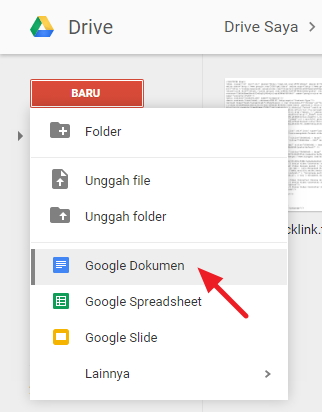
- After the document sheet opens, click the tab Add-ons => Get add-ons

- In the search field, type Speech Recognition function of this extension is you can tell commands that computer or laptop will respond, and you can dictate text to computer.
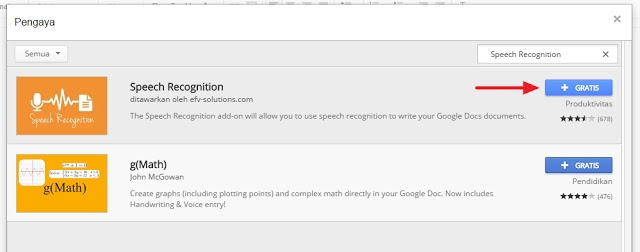
- An extension permission request will appear for Google account. click allow

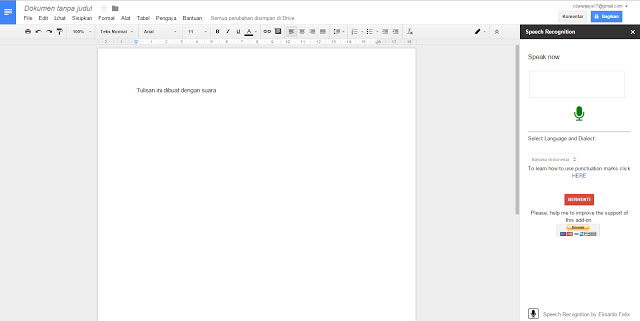
- Next, after successfully installed, click Pegaya => Speech Recognition => Start
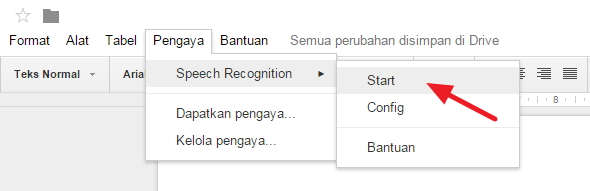
- On the right will appear a small box. select the language that will be used when saying the word. then click Start. Make sure the microphone is connected properly.

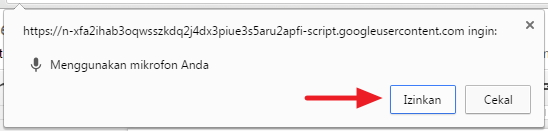
- Usually the browser will ask permission to access the microphone, click allow.

- Good luck


So much from me, may be useful.
greetings stemit Indonesia.