SuperEx Guide: SuperEx Web3 Wallet User Guide(VIII)
Before we knew it, we’ve already reached Part 8 of our SuperEx Web3 Wallet Guide. As one of the most fundamental topics in the crypto ecosystem, Web3 wallets are absolutely worth taking the time to understand — especially the SuperEx Web3 Wallet.
And here’s a little preview for everyone: the SuperEx Web3 Wallet Guide series is still ongoing. Part 8 is not the finish line.
Become a Medium member
Web3 wallets are decentralized and anonymous, making them a prime target for scams. Malicious actors use tactics such as mining, airdrops, and high-yield investment schemes to lure users into clicking on unknown links, granting wallet authorization on malicious websites, or stealing seed phrases/private keys, resulting in asset loss. Stolen assets are often difficult to recover, so please stay vigilant.
SuperEx Web3 Wallet FAQ(3)
How to Quickly Receive Digital Assets from a SuperEx Exchange Account? (App Version)
Step1:Open the SuperEx App and navigate to Web3 Wallet > Receive.
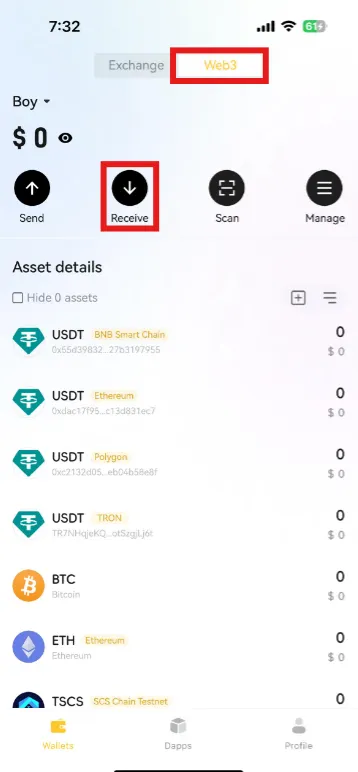
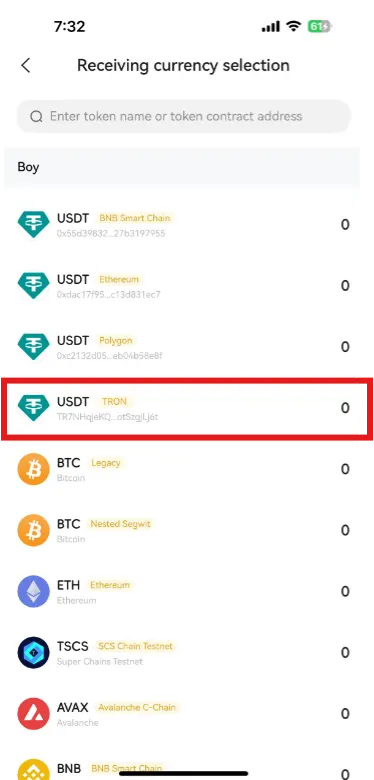
Step2:Choose the asset and network (e.g., USDT on Ethereum).
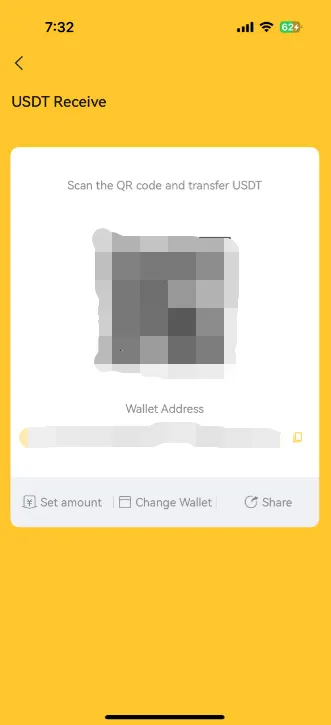
Step3:Copy the address, scan the QR code, or share the address with the sender.
Important:
Ensure that the sending token and network match the receiving token and network (e.g., USDT on ETH must be sent to USDT on ETH).
Where Can I Suggest New Features or Improvements?
We welcome your feedback! Contact us via:
Email: [email protected]
Customer Support: Scroll down on the app and tap “Customer Support”
Wallet Fees
When transferring assets, network fees are required and are collected by miners (not SuperEx). Ensure you have enough funds to cover fees, or transactions may fail.
If your wallet lacks the required token for fees, you can:
Swap assets within the wallet.
Transfer network fee tokens from your exchange account to your Web3 wallet.
