How to install a Teamspeak³ Server on Linux
In this tutorial I show how you can install a Teamspeak³ Server on Linux.
This tutorial is only for
LinuxSystems!

How to?:
First you open the official Teamspeak Website and find the Server files for your corresponding System.
Copy the link by clicking on the button right to the
DownloadButton.

If you're not sure if you have a
32 Bitor a64 BitSystem, just type into your command line:uname -m. If it saysx86_64, you are on a64 BitSystem and if it says anything else you are on a32 BitSystem.
Go into the Directory you want to install the server on. If you don't have one created yet, create one by first going into the home directory:
cd /home/and then creating a directory for it:mkdir ts3and then going into that directory:cd ts3/. You can of course choose yourself where you want to download it to.
Type into the command line(Putty or similar programs):
wget, a space and the link you just copied.
Now it should look something like this:
wget http://dl.4players.de/ts/releases/3.0.13.8/teamspeak3-server_linux_amd64-3.0.13.8.tar.bz2
PressEnterand wait until it has been downloaded.
Unpack the files by typing
tar -xf teamspeakand then pressingTabto autofill in the filename and then pressingEnterto actually run the command and unpack the files.
Go into the new created folder by typing
cd teamspeakand pressingTaband thenEnter. Move all files from the current folder into the parent directory by typingmv * ../and then again go into the parent directory by typingcd ../and remove the now empty folder by typingrmdir teamspeak, pressingTabagain and thenEnter. Now we still need to delete the package by typingrm teamspeak, pressingTabandEnter.
To start the Server we just run the startscript by typing
./ts3server_startscript.sh start.
Important: If you are starting your Server for the first time make sure to save the output to a file on your PC or Online Storage. The message will only show the first time you start the server!
Your first output should look somethink like this:
----------------------------------------------------------------
                      I M P O R T A N T
----------------------------------------------------------------
               Server Query Admin Account created
         loginname= "serveradmin", password= "GhlVR9rP"
----------------------------------------------------------------


----------------------------------------------------------------
                      I M P O R T A N T
----------------------------------------------------------------
      ServerAdmin privilege key created, please use it to gain
      serveradmin rights for your virtualserver. please
      also check the doc/privilegekey_guide.txt for details.

       token=HOQk6m4LdqJ30euKChvr9H5BfKL3dtwdOEwi6DgQ
----------------------------------------------------------------
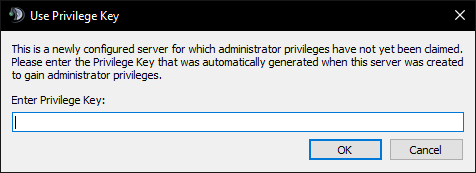
Copy the token and join your newly installed Teamspeak Server and fill the token into the popup message.
Done!
Thats it!
Now you have a freshly installed Teamspeak³ Server and you can do whatever you want with it!
Congratulations @fertax! You received a personal award!
Click here to view your Board of Honor