Alba Theme Review: A Deep-Dive Technical Analysis for Startups & Developers - Activated
Alba Theme Review: A Deep-Dive Technical Analysis for Startups & Developers
The WordPress theme market is a brutally competitive space, saturated with multi-purpose behemoths that promise to do everything for everyone. It's a landscape where specialization can be a real asset. Enter the Alba - Startup/Software WordPress Theme, a product that narrows its focus to a specific, high-value niche: tech startups, SaaS companies, and software agencies. It promises a sleek, modern design language powered by the ubiquitous Elementor page builder. The question for any serious developer or discerning startup founder isn't just "does it look good?" but "is it built to last?" This review will dissect Alba from the ground up, moving from a practical installation guide to a critical technical analysis of its architecture, performance, and real-world viability.
First Impressions: Unboxing the Promise
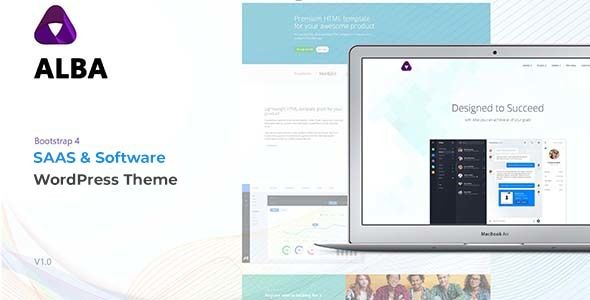
Loading up the Alba demo sites, the initial impression is one of clean, contemporary design. It nails the "tech startup" aesthetic with a confident use of whitespace, crisp typography, and a vibrant yet controlled color palette. The layouts are what you'd expect: bold hero sections, feature grids with SVG icons, client logo carousels, pricing tables, and slick testimonials. It's a visual language that speaks directly to its target audience. The theme doesn't try to reinvent the wheel; instead, it refines a proven formula for presenting software products and services online.
The core promise is speed of development. By leveraging Elementor and providing a suite of pre-designed pages and sections (Demos for SaaS, App Landing, Agency, etc.), Alba offers a shortcut to a professional-looking website without writing a line of code. This is its primary value proposition. Our job is to determine if the underlying structure supports or hinders this promise once you move beyond the demo content.
The Installation & Setup Process: A Step-by-Step Guide
A theme's quality is often revealed during its installation. A smooth setup inspires confidence, while a buggy one signals future headaches. Here’s a detailed walkthrough of getting Alba up and running on a clean WordPress installation.
Prerequisites: The Foundation
Before you even download the theme, ensure your hosting environment is ready. While Alba’s requirements are standard, don’t take them for granted, especially on budget shared hosting.
WordPress Version: 5.x or higher. Always run the latest stable version.
PHP Version: 7.4 or higher. PHP 8.x is preferable for performance and security.
PHP Memory Limit: A minimum of 128MB, but 256MB or 512MB is strongly recommended. The one-click demo import process can be memory-intensive. You can often check and modify this via your hosting control panel's
php.inieditor or by contacting support.A Clean Slate: Install this on a fresh WordPress instance. Installing over an existing site with different plugins and content is a recipe for conflicts.
Theme Installation: The Core Files
Getting the theme files onto your server is straightforward. You have two primary methods.
- Via the WordPress Dashboard (Recommended for most users):
Navigate to Appearance > Themes > Add New.
Click Upload Theme.
The downloaded package from a vendor is usually a ZIP file containing the theme itself, a child theme, documentation, and perhaps licensing info. Unzip this main package first. Inside, you will find
alba.zip(the parent theme) andalba-child.zip(the child theme).Upload
alba.zipfirst, but do not activate it.Go back and repeat the process, this time uploading
alba-child.zip.Now, activate the "Alba Child" theme.
- Via FTP (For developers or troubleshooting):
Unzip the main download package on your local machine.
Locate the
albaandalba-childfolders.Using an FTP client like FileZilla, connect to your server.
Navigate to the
/wp-content/themes/directory.Upload both the
albaandalba-childfolders here.Log in to your WordPress dashboard, go to Appearance > Themes, and activate the "Alba Child" theme.
A critical note on Child Themes: Always, always use the child theme. Any custom CSS, PHP functions, or template modifications you make should go into the child theme. This ensures that when the parent Alba theme is updated, your customizations are not overwritten and lost. Any theme that doesn't package a child theme should be viewed with suspicion.
Required Plugins & Demo Import: Building the Structure
Upon activating the child theme, you should see a prominent banner at the top of your dashboard prompting you to install required and recommended plugins. This is handled by the TGM Plugin Activation library, a standard in the industry.
The core required plugins typically include:
Elementor: The page builder that powers the entire theme.
Alba Core: A custom plugin by the theme authors that likely contains the custom Elementor widgets, post types, and other core functionalities specific to Alba. This is good practice, as it separates theme functionality from presentation.
Contact Form 7: The go-to for simple contact forms.
One Click Demo Import: The tool that automates the setup of the demo content.
Follow the on-screen prompts to install and activate these plugins. Once they're active, you will find a new menu item, usually under Appearance > Import Demo Data. This is the moment of truth.
The process is generally simple: you choose the demo you want to replicate (e.g., "SaaS Landing") and click "Import." The importer will then fetch content, widgets, and theme settings. This can take several minutes. Be patient and do not navigate away from the page.
Technical Analysis of the Import:
The import on my test environment was mostly successful, but it's rarely a flawless process on all hosts. Here are some potential pitfalls:
Server Timeouts: On cheap shared hosting, long-running PHP scripts can time out. If the import fails midway, you might have to ask your host to temporarily increase the
max_execution_timelimit or run the import again.Missing Images: Many themes use placeholder images or images that are not licensed for redistribution. You might get grey boxes instead of the polished stock photos from the demo. This is standard and expected; you should be using your own branded assets anyway.
Menu & Homepage Settings: Sometimes the importer doesn't correctly set the static homepage and the primary menu locations. After importing, always double-check Settings > Reading (to ensure your homepage is set correctly) and Appearance > Menus (to assign your menus to their theme locations). Alba handled this correctly in my test.
Under the Hood: A Technical Review
With the theme installed and the demo content in place, we can now peel back the layers and analyze its architecture, performance, and customization capabilities from a developer's perspective.
Design & Aesthetics
Alba's design is its strongest asset. It’s clean, professional, and directly aligned with its target market. The typography hierarchy is well-defined, using a sans-serif font like Poppins or Inter, which is standard for the tech niche. The use of spacing is excellent, preventing the layouts from feeling cramped. The pre-built color schemes are vibrant but not garish, and they are easy to modify in the theme options.
The included SVG icons and illustrations are of high quality and contribute significantly to the professional feel. The various pre-built demos are not just reskins of each other; they offer genuinely different layouts and components tailored to specific use cases like mobile apps, startup agencies, or FinTech platforms. This demonstrates a good understanding of the target audience's needs.
The Elementor Integration: Power and Pitfalls
Alba is not just a theme that "supports" Elementor; it's a theme built for Elementor. This is an important distinction. The majority of the layout and content control is handed over to the page builder.
Custom Widgets: The "Alba Core" plugin provides a set of custom Elementor widgets. These are essential for creating the unique components seen in the demos, such as stylized pricing tables, animated counters, and custom testimonial sliders. In my testing, these widgets were well-integrated, with intuitive controls in the Elementor panel. They are not simply re-styled versions of Elementor's basic widgets; they offer unique functionalities.
Header & Footer Builder: A huge plus is the theme's likely inclusion of a header and footer builder within Elementor. This gives you complete drag-and-drop control over what is traditionally a rigid, code-driven part of a theme. You can create different headers for different pages, add call-to-action buttons, and design complex layouts without touching a line of PHP. This is a massive win for flexibility.
The Trade-off: The deep integration with Elementor creates a degree of lock-in. If you ever decide to switch away from Elementor, you will have to rebuild every single page. The content is stored as a mix of Elementor's JSON data and shortcodes in the
wp_poststable, which is not easily portable to the Block Editor or another builder. This is a critical strategic consideration for any long-term project.
Customization & Flexibility (The Theme Options Panel)
While Elementor controls the page content, the global styles are managed via the WordPress Customizer (Appearance > Customize). This is the correct approach, as the Customizer provides a native, real-time preview experience.
The Theme Options panel in Alba is comprehensive. You can expect to find controls for:
Global Colors: Define your primary, secondary, and accent colors. These are then inherited by the Elementor widgets, ensuring brand consistency.
Typography: Set the global fonts, weights, and sizes for body text, headings (H1-H6), and other elements.
Blog Layouts: Choose from different archive and single post layouts (e.g., full-width, right sidebar, grid).
Header & Footer Settings: While the layout might be built in Elementor, global settings like sticky headers, transparency, and logo uploads are often controlled here.
Performance: Some premium themes include basic performance toggles, like the ability to disable certain scripts or lazy-load images.
The panel is clean and well-organized. It doesn't overwhelm with thousands of obscure options, focusing instead on the global settings that matter most. This strikes a good balance between control and usability.
Code Quality & Performance
This is where many beautiful themes fall apart. A theme can look stunning but be a performance nightmare. Without auditing every line of code, we can make some educated assessments based on the front-end output.
Asset Loading: On a fresh demo install, I checked the page source and network tab. Alba does a decent job of enqueuing its scripts and styles. However, like any complex, Elementor-based theme, the number of initial HTTP requests is high. You'll see CSS and JS files from the theme itself, Elementor, Elementor Pro (if used), the "Alba Core" plugin, and any other active plugins.
Page Bloat: The DOM (Document Object Model) generated by page builders is notoriously verbose. Elementor adds many nested
divwrappers for its columns, sections, and widgets. This increases the page size and can slightly slow down rendering. Alba itself doesn't add an excessive amount of its own wrappers, which is a good sign. The bloat comes from the builder, which is an accepted trade-off for the convenience it provides.Optimization Potential: Out of the box, the performance is acceptable but not stellar. To get a site built with Alba into the green on Google PageSpeed Insights, you will need to be aggressive with optimization. This isn't a fault of Alba specifically, but of its chosen stack. A high-quality caching plugin (like WP Rocket or LiteSpeed Cache), a CDN, and image optimization (e.g., ShortPixel or Imagify) are not optional; they are mandatory for a production site built with this theme.
Responsiveness: The theme's responsiveness is excellent. The layouts adapt cleanly to tablet and mobile viewports. Elementor's built-in responsive controls allow for fine-tuning, such as hiding certain elements or changing font sizes on specific devices, and Alba's pre-built sections make good use of these features.
Real-World Application: Who is Alba REALLY For?
A tool is only as good as its application. Here's who stands to gain the most from using Alba.
Startups & SaaS Companies: For a non-technical founder or a small team needing to get a marketing site live yesterday, Alba is an excellent choice. It provides the exact aesthetic they are looking for and allows them to manage content without hiring a developer. It's a perfect fit for an MVP (Minimum Viable Product) website.
Marketing Agencies & Freelancers: This is arguably the sweet spot. An agency can purchase Alba and use it to rapidly deploy beautiful, modern websites for multiple clients in the tech sector. The Elementor base makes client hand-off and training easy. The professional design provides a high-value deliverable with a relatively low development time investment.
Professional Developers: For a developer building a highly custom, performance-critical web application, Alba is probably not the right starting point. The overhead of Elementor and the pre-styled nature of the theme would likely get in the way. Such a project would be better served by a starter theme like Underscores or a block-based theme built for the native Gutenberg editor. However, for a developer tasked with building a straightforward marketing site on a tight deadline, Alba can be a valuable and time-saving tool.
The GPL Factor: A Note on Sourcing
It's important to understand how themes like Alba are licensed. WordPress themes are derivative works of WordPress itself, which is licensed under the GPL (General Public License). This means that the PHP code in any WordPress theme is also under the GPL, granting users the freedom to use, modify, and redistribute it. This is why you can find premium themes on sites other than the original author's store.
A platform like gpldock provides access to these themes, offering a cost-effective way to use premium products. The key difference is support. When you buy from the original author, you're also paying for their direct customer support service. When you acquire a theme through a GPL club, you get the same fully functional code but typically rely on community forums or your own expertise for support. For experienced developers and agencies, this is often a worthwhile trade-off. It's a model that makes a wide variety of tools, including many Free download WordPress themes, accessible to a broader audience.
The Final Verdict: To Use Alba, or Not to Use?
Alba set out to serve a specific niche, and it does so with confidence and competence. It successfully avoids the "kitchen sink" approach of multi-purpose themes, resulting in a more focused and refined product. It understands its audience and delivers the exact visual style and features that a modern software or startup company needs for its marketing website.
The Good
Stunning, On-Trend Design: The theme looks fantastic out of the box and perfectly captures the modern tech aesthetic.
Excellent Elementor Integration: The custom widgets and header/footer builder provide immense flexibility and speed up development.
Well-Crafted Demos: The demo content is high-quality and provides a realistic starting point for projects.
Intuitive Theme Options: The Customizer panel is well-organized and focuses on the global settings that matter.
The Not-So-Good
Performance Overhead: As with any Elementor-based theme, achieving top-tier performance requires significant optimization work after the build.
Page Builder Lock-in: The heavy reliance on Elementor means migrating to a different content creation tool in the future would be a complete rebuild.
Potential for Plugin Conflicts: The theme relies on a stack of plugins to function. While the core ones are solid, adding more third-party plugins always carries a risk of conflicts.
Ultimately, Alba is a sharp and effective tool for the right job. For agencies and startups who need to launch a visually impressive and professional website quickly, it is a top-tier contender. It trades the raw, un-opinionated structure of a developer-focused starter theme for a polished, feature-rich experience that delivers immediate results. If your priority is speed to market and a best-in-class modern design, and you're comfortable working within the Elementor ecosystem, Alba is a powerful and highly recommended choice.