Deconstructing Handy Expert: A Developer's Deep Dive and Installation Guide - Download
Deconstructing Handy Expert: A Developer's Deep Dive and Installation Guide
The on-demand economy isn't just a trend; it's a permanent fixture of our service landscape. Consumers now expect the ability to summon a plumber, electrician, or cleaner with a few taps on their phone. For entrepreneurs and development agencies, this creates a massive opportunity, but building a robust, multi-vendor platform from scratch is a monumental task. This is the gap that pre-built solutions aim to fill. Today, we're tearing down one such product: the Handy Expert - Multi-Vendor On Demand Home Services Flutter App - Android - iOS. We're not just looking at the sales page; we're diving into the code, navigating the installation process, and delivering a verdict on whether this is a solid foundation for a business or a technical debt nightmare waiting to happen. This review is based on the version available from sources like gpldock, which provide access to GPL-licensed software for evaluation and development.
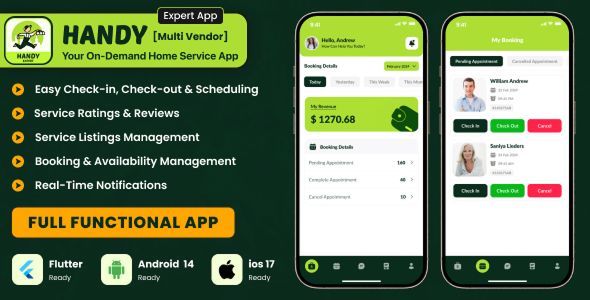
Part 1: The Promise vs. Reality - A Feature Breakdown
Handy Expert presents itself as a turnkey solution. The core promise is a complete ecosystem with three main components: a customer app to book services, a provider app for professionals to manage jobs, and a comprehensive admin panel to run the entire operation. Let's dissect the technology and see how the features stack up in practice.
The Technology Stack: A Solid, Mainstream Choice
The developers made some sensible, if predictable, technology choices. This is generally a good thing for a product meant for wide adoption and customization.
Frontend (Mobile Apps): Flutter. Google's cross-platform UI toolkit is the star of the show. The immediate benefit is a single codebase for both Android and iOS, which drastically cuts down development and maintenance time compared to building two native apps. For a startup, this is a huge win. The risk, as with any cross-platform framework, is in hitting performance ceilings or dealing with platform-specific quirks, but Flutter has matured significantly, making this a calculated and reasonable choice.
Backend (API & Admin Panel): Laravel. The PHP world's darling framework. Laravel's robust, MVC architecture, combined with its elegant syntax and powerful features like the Eloquent ORM and Artisan command-line tool, make it a top-tier choice for building scalable APIs. This is a far cry from the spaghetti code of old-school PHP projects. The choice of Laravel suggests a commitment to modern development practices on the backend.
Database: MySQL. The workhorse of the web. It's reliable, well-documented, and understood by virtually every developer and hosting provider on the planet. No surprises here, and that's a good thing.
Feature Audit: A Critical Look at the User Experience
A feature list is just a list. What matters is the execution. I installed the apps and ran them through their paces, acting as a customer, a provider, and the all-powerful admin.
The Customer App
The onboarding process is straightforward: register, log in, and you're presented with a list of service categories. The UI is clean, if a bit generic. It feels like a standard "template" app, which it is. That's not necessarily a negative; it's functional and users will find it familiar.
Service Booking: The core loop works. You select a category (e.g., "Plumbing"), browse providers, view their profiles, and initiate a booking. You can specify a date, time, and location. The process is logical.
Provider Profiles & Reviews: Customers can see a provider's services, pricing, and ratings from past jobs. This is essential for building trust and is implemented competently.
In-App Chat: A crucial feature. The app includes a messaging system for customers and providers to communicate directly about job details. In my testing, it was functional but basic. It lacks some of the richer features like image sharing out-of-the-box that users might expect, representing an area for future enhancement.
Payment Integration: The app advertises integration with major gateways like Stripe, PayPal, and Razorpay. This is a huge selling point. However, be aware that these are just placeholders. You will need to create your own merchant accounts and plug in your own API keys. The plumbing is there, but you have to connect the pipes.
The Provider App
The provider's side of the equation is equally important. A clunky app will drive away the very professionals your business relies on.
Job Management: Providers get notifications for new booking requests, which they can accept or decline. Once accepted, the job appears in their schedule. The workflow is clear and efficient.
Profile & Service Management: Providers have a surprising amount of control. They can set their availability, define the specific services they offer (e.g., "Leaky Faucet Repair," "Drain Unclogging"), and manage their pricing. This level of autonomy is critical for a true multi-vendor marketplace.
Payouts & Earnings: A dashboard shows providers their completed jobs, total earnings, and pending payouts. This transparency is vital for provider retention.
The Admin Panel
This is the command center, and for many business owners, the most important part of the package. The Laravel-based admin panel is where you control the entire ecosystem. It's powerful, but also dense.
Management Capabilities: From here, you can manage everything: customers, providers, service categories, bookings, commissions, and disputes. You can manually approve new providers, set the commission rate for the platform, and view detailed reports.
The Commission System: The implementation is solid. You can set a platform-wide percentage fee that is automatically deducted from provider earnings on each completed job. This is the financial engine of the business model, and it appears to be well-conceived.
Customization: Because it's a Laravel application, a competent PHP developer can extend this panel infinitely. Need a custom report? A new verification step for providers? It's all possible, but it will require custom coding.
Part 2: Under the Hood - Code Quality and Architecture
A pretty UI means nothing if the code underneath is a mess. I unzipped the source files and spent time analyzing the structure. This is where a pre-built solution either proves its value or reveals itself as a liability.
Flutter App Structure: Room for Improvement
Upon opening the Flutter project, my first impression was mixed. The file and folder structure is present, but it doesn't strictly adhere to any one popular state management or architectural pattern in a disciplined way. It seems to be a custom mix of approaches, which can make onboarding a new developer a bit challenging.
State Management: It appears to use a combination of
setStatefor local state and a service-based approach for handling API calls. While functional, it's not as clean or scalable as a more structured pattern like BLoC or Provider. A developer taking over this project would likely want to refactor key areas to use a more robust state management solution to prevent future complexity.Code Readability: The code is reasonably commented in some areas and completely bare in others. Variable naming is mostly sensical, but there are instances of short, undescriptive names (
val,res,data). There are also a number of hardcoded strings and values for colors and dimensions. A good first step for any developer would be to extract these into a centralconstantsorthemefile to make future branding changes easier.Configuration: The most critical configuration, the API base URL, is located in a constants file. This is good. It's easy to find and change. However, other configurations, like API keys for Google Maps, are sprinkled throughout the code. This makes setup more tedious than it needs to be.
Laravel Backend: A Stronger Foundation
The backend code, thankfully, is in better shape. It's clear that the developers have a solid grasp of Laravel best practices.
MVC Structure: The project follows the standard Model-View-Controller pattern. Routes are clearly defined in the
routes/api.phpfile, pointing to dedicated controller methods. The logic is kept out of the routes file, which is a sign of a clean architecture.Eloquent ORM: The code makes proper use of Laravel's Eloquent ORM for database interactions. I saw very few raw SQL queries, which is a major plus for security (prevents SQL injection) and maintainability. Relationships between models (User, Provider, Booking) seem to be correctly defined.
API Design: The API is largely RESTful. Endpoints are resource-oriented (e.g.,
/api/bookings,/api/providers), and it uses standard HTTP verbs. A Postman collection or OpenAPI/Swagger documentation was not included, which is a missed opportunity. Any team using this will need to create one as a top priority to facilitate frontend-backend communication and testing.
Part 3: The Setup Gauntlet - A Step-by-Step Installation Guide
This is where the rubber meets the road. Getting a multi-part system like this running locally is the first real test. Don't expect a one-click install. You'll need to be comfortable with server configuration and command-line tools. Here is my no-fluff guide.
Prerequisites
Do not start without these. Get them installed and ensure they are in your system's PATH.
Web Server: Apache or Nginx.
PHP: Version 8.0 or higher, with common extensions (mbstring, curl, pdo_mysql, gd).
Composer: The PHP dependency manager.
Database: A running MySQL or MariaDB server.
Flutter SDK: The latest stable version is recommended.
IDE: Android Studio or VS Code with Flutter and Dart plugins.
Git: For version control. You should initialize a git repository immediately.
Step 1: Backend (Laravel) Setup
The backend must be running before the mobile app will function.
Get the Code: Unzip the backend source code into a directory on your web server (e.g.,
/var/www/handy-expert).Database Creation: Using a tool like phpMyAdmin or the command line, create a new, empty database (e.g.,
handy_expert_db) withutf8mb4_unicode_cicollation.Configure Environment: Find the
.env.examplefile, duplicate it, and rename the copy to.env. This file is critical. Open.envand update the following lines:
DB_CONNECTION=mysql
DB_HOST=127.0.0.1
DB_PORT=3306
DB_DATABASE=handy_expert_db
DB_USERNAME=your_db_user
DB_PASSWORD=your_db_password

APP_URL=http://your-domain.com
**Important:** The `APP_URL` must be the public URL of your backend. For local testing, this might be `http://localhost/handy-expert/public`.
Install Dependencies: Open a terminal in the root of your backend project and run:
composer install.Generate App Key: Run:
php artisan key:generate.Run Migrations & Seeders: This creates the database tables and populates them with initial data (like admin user, service categories). Run:
php artisan migrate --seed.Configure Web Server: Configure your web server's document root to point to the
publicdirectory of your Laravel project. This is a common point of failure. The root should NOT be the project's root folder.Verify Backend: Visit your
APP_URLin a browser. You should see the admin panel login page. Try logging in with the default credentials found in the documentation or database seeder files.
Step 2: Flutter Apps Configuration
Now, let's connect the mobile apps to your running backend.
Open the Project: Open the Flutter app's source code folder in VS Code or Android Studio.
Install Dependencies: Open a terminal in the IDE and run:
flutter pub get.Set the API URL: This is the most important step. Find the configuration file where the base URL is defined. It's often in a file like
lib/network/network_utils.dartorlib/utils/constant.dart. Change the placeholder URL to your backend's API endpoint.
// Example
const API_URL = 'http://your-domain.com/api/';
Configure Package ID: To prepare for app store submission, you must change the default package name (e.g.,
com.example.handyexpert). This is a multi-step process involving changes inandroid/app/build.gradle,android/app/src/main/AndroidManifest.xml, and the corresponding files in theiosdirectory. Use a tool likeflutter_launcher_nameto simplify this.Setup Firebase (Push Notifications): Push notifications will not work without this.
Create a new project in the Firebase Console.
Register an Android and an iOS app within the project. Follow the on-screen instructions.
For Android, you will download a
google-services.jsonfile. Place this file in theandroid/app/directory.For iOS, you'll download a
GoogleService-Info.plistfile and add it to your project via Xcode.You will also need to get the server key from Firebase and add it to your Laravel
.envfile for the backend to send notifications.
- Run the App: Connect a device or start an emulator and run the app using
flutter run. If everything is configured correctly, the app should launch, connect to your backend, and display the service categories you seeded earlier.
Common Stumbling Blocks
CORS Errors: If the app can't connect to the API, the first thing to check is a Cross-Origin Resource Sharing (CORS) error in your browser's developer console (when inspecting the web app) or network logs. The Laravel backend includes a CORS configuration file (
config/cors.php) that might need to be adjusted to allow requests from your app's origin.Incorrect APP_URL: If images aren't loading or links are broken in the admin panel, it's almost always because the
APP_URLin your.envfile is incorrect.Permissions Errors: The
storageandbootstrap/cachedirectories in your Laravel project need to be writable by the web server. A quickchmodorchowncommand usually fixes this.
The Verdict: Is Handy Expert Worth Your Time?
After a thorough review of the features, code, and installation process, we can draw a clear conclusion. The Handy Expert app is not a polished, ready-to-deploy final product. It is a powerful, feature-rich starter kit.
For the Entrepreneur: If you are non-technical, do not buy this thinking you can launch your business next week. You will need to hire a developer—one proficient in Flutter and another in Laravel—to perform the setup, customization, and branding. However, as a starting point, this kit could save you tens of thousands of dollars and months of development time compared to building from scratch. The core logic for booking, payments, and commissions is there. You are buying a significant head start, not a finished race car.
For the Developer: This is a solid foundation to build upon. The backend is relatively clean and follows modern conventions. The Flutter app, while needing some architectural refactoring for long-term scalability, is functional and covers all the essential features. You will spend your initial time not on building a chat system from scratch, but on connecting it to Twilio; not on designing a booking flow, but on refining the existing one. This is a massive productivity boost. Your first month will be spent on setup, bug fixing, and branding, not on fundamental architecture. While this is a complex application, many developers cut their teeth on simpler projects, exploring things like Free download WordPress themes to get a feel for different code structures before jumping into a full-stack mobile platform.
In short, Handy Expert is a valuable but demanding asset. It delivers on its promise of a comprehensive feature set built on a modern tech stack. But it demands technical expertise to set up, customize, and maintain. If you go in with the right expectations—treating it as an accelerator, not a magic bullet—it has the potential to be the cornerstone of a successful on-demand service business.