Deconstructing the AI Calorie Tracker: A Developer's Deep Dive into an iOS App Source Code - Unlimited Sites
Deconstructing the AI Calorie Tracker: A Developer's Deep Dive into an iOS App Source Code
The App Store is in the middle of a gold rush, and the new frontier is Artificial Intelligence. Every developer and their dog is scrambling to bolt an "AI" feature onto their app, promising smarter, faster, and more magical user experiences. In the health and fitness category, this has manifested as a wave of AI-powered calorie counters. The promise is simple: point your phone's camera at a meal, and let the app figure out the rest. This is a compelling pitch, but building it from scratch is a significant undertaking. This is where pre-built solutions come in, and today we're tearing down the AI Calorie Tracker - iOS App Source Code. We're going to treat this not as a finished consumer product, but as what it is: a foundation. Our goal is to determine if it's a solid concrete slab ready for a skyscraper or a cracked foundation riddled with technical debt, waiting to crumble under the weight of your ambitions.
First Impressions: The Pitch vs. The Project
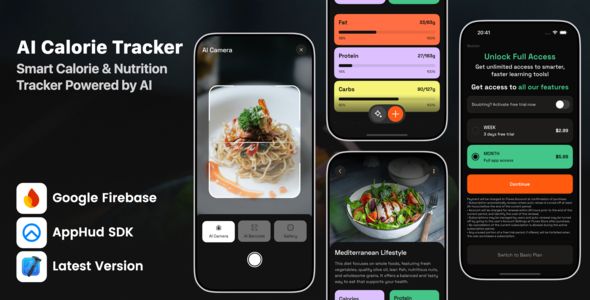
The product page promises a modern, feature-rich calorie tracker. The core features are exactly what you'd expect:
AI Food Recognition: The main selling point. Snap a photo, get nutritional data.
Barcode Scanning: A table-stakes feature for any serious food tracker.
Manual Entry & Food Database: For when the AI fails or you're eating something without a label.
Dashboard & Progress Tracking: Charts and stats to visualize caloric intake, macros, and weight over time.
User Authentication: Standard sign-up, login, and profile management.
From a UI/UX perspective, the screenshots showcase a clean, contemporary design. It looks like a standard SwiftUI app, with cards, bold titles, and colorful charts. It avoids the dated look of many older UIKit apps still lingering on the store. The user flow appears logical: a main dashboard tab, a tab for logging food, and a profile/settings tab. This is a proven pattern that users understand instinctively. However, screenshots can be deceiving. The real test is in the code that powers this interface and whether it's as clean as the UI it generates.
Under the Hood: The Technical Stack
Cracking open the Xcode project is where the real review begins. A slick UI can hide a multitude of sins, so a thorough inspection of the project's DNA is non-negotiable.
Language and UI Framework: Swift & SwiftUI
The project is built entirely in Swift using SwiftUI for the user interface. This is a significant green flag. It tells us the codebase is modern and aligns with Apple's future direction for iOS development. Working with SwiftUI means you get a declarative syntax that's generally faster for building and iterating on UIs compared to UIKit's programmatic or Storyboard-based approach. State management is handled through SwiftUI's native property wrappers like @State, @ObservedObject, and @EnvironmentObject. For a developer looking to customize this app, a SwiftUI foundation is far more appealing and easier to work with than a legacy UIKit project, especially for those new to the iOS ecosystem.
Dependency Management: Swift Package Manager (SPM)
Dependencies are managed via Swift Package Manager, which is integrated directly into Xcode. This is the preferred, modern approach, superior to the older CocoaPods system. It simplifies setup and reduces potential conflicts. Running the project doesn't require a separate pod install command; Xcode handles fetching the packages automatically. The key dependencies included are revealing:
- Firebase: This is the backend-as-a-service (BaaS) for the entire application. The source code uses several Firebase products:
FirebaseAuth: For handling user sign-up, login, and session management.Firestore: A NoSQL database used to store user data like logged meals, weight entries, and profile information.FirebaseStorage: Used for uploading the images users take of their food for AI analysis.
This is a smart choice for a source code product. Firebase is well-documented, has a generous free tier, and scales easily. A buyer doesn't need to provision and manage their own server.
Alamofire: The go-to networking library for Swift. Its inclusion suggests the app makes network calls outside of the Firebase SDK, likely to the third-party food recognition API.
SwiftUICharts: A library for creating the graphs and charts seen on the dashboard. This saves a huge amount of time compared to building custom chart views from scratch.
The "AI" in AI Calorie Tracker: A Critical Analysis
The core value proposition of this app is its "AI" food recognition. This is the feature that will make or break its market appeal. Digging into the code reveals how this is implemented, and it's a critical detail for any potential buyer.
Cloud-Based API, Not On-Device Core ML
The "AI" is not happening on the user's device. There is no large Core ML model bundled with the app. Instead, the process works like this:
The user takes a photo of their meal.
The app uploads this photo to Firebase Storage.
A cloud function (or a direct call from the app) sends the image URL to a third-party food vision API.
This API analyzes the image and returns a list of identified food items with their nutritional estimates.
The app parses this response and displays it to the user.
The code uses Alamofire to make a POST request to an external API endpoint. In the configuration files, you'll find a placeholder for an API key. This is the most important part of the setup: the app is useless without a subscription to this third-party AI service. This is a common and perfectly valid approach, but it has significant implications:
Cost: These APIs are not free. They typically charge per API call. Before launching, you must budget for this operational expense. If your app gets 10,000 users making one recognition per day, you could be looking at a significant monthly bill.
Latency: The entire process (upload, analysis, download) takes time. The user experience is dependent on the user's network connection and the API's response time. The code needs robust handling for this, like showing a loading indicator and handling timeouts gracefully.
Accuracy & Reliability: You are completely dependent on the quality of the third-party API. If their service goes down, your app's main feature is broken. If their model is inaccurate, users will get frustrated and leave negative reviews. You must research the specific API provider used and be prepared to potentially swap it out for a different one.
Architecture and Code Quality: The Foundation's Integrity
A good-looking app with great features can still be a nightmare if the code is a mess. We're looking for clean, maintainable, and scalable code.
Architecture: MVVM (Model-View-ViewModel)
The project follows the MVVM architecture, which is a natural fit for SwiftUI.
- Models: Simple structs that define the data, like FoodItem, MealLog, and User. They are Codable, making them easy to serialize to and from Firestore and API JSON.
- Views: The SwiftUI Views. They are mostly lightweight and focused on layout and presentation. They observe ViewModels for their state.
- ViewModels: The ObservableObject classes that act as the brain for each view. They contain the business logic, perform data fetching from Firebase and the AI API, and expose the processed data to the Views via @Published properties.
The separation of concerns is generally well-executed. Logic is not improperly placed in the Views. This makes the code easier to understand, test, and modify. For example, adding a new macro-nutrient to track would primarily involve changes in the Model and ViewModel, with minimal disruption to the View layer.
Code Readability and Maintainability
The code quality is surprisingly high for a commercial source code package.
- Naming Conventions: Variables and functions have clear, descriptive names (e.g., fetchDailyIntake(), logMealToFirestore()).
- Comments: The code isn't littered with useless comments, but complex sections, especially the API integration and data mapping, are adequately explained.
- Modularity: The code is broken down into logical folders: Views, ViewModels, Models, Services, Helpers. The Services directory is particularly well-organized, with separate files for FirebaseService and NutritionAPIService, abstracting away the specifics of data fetching.
- Error Handling: The networking code uses Swift's Result type to handle success and failure cases, which is a modern and robust pattern. It avoids the ugly pyramid of doom common in older callback-based code.
One minor criticism is the lack of extensive unit tests. While the architecture supports testability, no test targets are pre-configured. A buyer would need to add their own tests to ensure stability as they add new features.
The Developer's Gauntlet: Installation and Customization Guide
Getting this source code from a zip file to a running app on your device is the first hurdle. Here's a no-fluff guide.
Prerequisites:
- A Mac with the latest version of Xcode installed.
- A paid Apple Developer account (for testing on a physical device and for App Store submission).
- A Firebase account.
- An account with the third-party food vision API provider (this will be specified in the documentation that comes with the code).
Step 1: Firebase Project Setup
Go to the Firebase console and create a new project.
Within the project, create a new iOS app. The bundle identifier you enter here MUST match the one you'll use in Xcode.
Follow the instructions to download the
GoogleService-Info.plistfile. This file contains the keys that link your app to your Firebase project.Enable the services you'll need: Authentication (with Email/Password), Firestore Database, and Storage.
Step 2: Xcode Project Configuration
Unzip the source code and open the
.xcworkspacefile in Xcode.Drag the
GoogleService-Info.plistfile you downloaded into the root of your Xcode project. Ensure it's added to the main app target.Select the project in the Project Navigator, then go to the "Signing & Capabilities" tab. Change the "Bundle Identifier" to the unique one you registered in the Firebase console. Select your developer team for signing.
Find the configuration file (likely named
Constants.swiftorConfig.swift). This is where you'll paste your API key for the food recognition service. It will look something like this:let nutritionAPIKey = "YOUR_API_KEY_HERE"
Step 3: Rebranding and Reskinning
Colors & Fonts: Open the
Assets.xcassetsfile. You will find aColorsfolder. Here you can edit the app's primary, secondary, and accent colors to match your brand. Fonts are typically set in a central place, either in a custom SwiftUIViewModifieror directly in the views. A project-wide search for.font()will reveal where to make changes.App Icon: Also in
Assets.xcassets, you'll find theAppIconset. You'll need to generate your own icon in all the required sizes and drag them into the appropriate slots.Text and Strings: A crucial quality check is to see if text is hardcoded. A well-built app uses
Localizable.stringsfiles. In this codebase, most user-facing strings are wrapped inNSLocalizedString("key", comment: ""). To change text or add translations, you just need to edit theLocalizable.stringsfile. This is a massive win for customization.
Step 4: Build and Run
Connect a physical iOS device and hit the "Run" button in Xcode. The first build may take a moment as Xcode indexes files and fetches Swift Packages. Common issues at this stage are usually related to incorrect bundle identifiers or code signing problems, which are easily fixed in the "Signing & Capabilities" tab.
Monetization and Market Viability
Buying source code is an investment. The goal is to generate a return. The app comes pre-configured with a basic In-App Purchase (IAP) setup using StoreKit. It's designed for a "Pro" subscription model that unlocks unlimited AI scans or advanced tracking features.
The business of buying and flipping app source code is a numbers game, not unlike the web development world where platforms like gpldock provide developers with a head start. Just as a web developer might use pre-built components to launch a site quickly, an app developer uses source code to accelerate their entry into the App Store. The market for assets like Free download WordPress themes has proven that a solid, customizable foundation is an incredibly valuable commodity. This iOS source code fits that same mold.
However, the health and fitness app market is brutally competitive. You'll be going up against giants like MyFitnessPal and Lifesum. Your success will not come from simply rebranding this app and launching it. Success will come from finding a niche. Could you rebrand this as a "Keto Diet AI Tracker"? Or a "Vegan Food Scanner"? The value of this source code is not as a finished product, but as a flexible base that saves you 90% of the development time, allowing you to focus your energy on a unique market position and feature set.
The Verdict: Is This Source Code a Launchpad or a Landmine?
After a thorough technical review, the "AI Calorie Tracker - iOS App Source Code" is a definite launchpad, but one that requires a competent pilot.
The Good:
Modern Tech Stack: Built with SwiftUI and Swift Package Manager, ensuring it's future-proof and pleasant to work with.
Clean Architecture: The consistent use of MVVM makes the code organized, scalable, and easy to understand.
Solid Backend Choice: Using Firebase abstracts away server management, letting developers focus on the app itself.
High Code Quality: The code is readable, modular, and uses modern Swift practices for networking and error handling. Customization is straightforward.
The Bad:
External Dependencies: The business model is critically dependent on a third-party API for its core feature. This introduces ongoing operational costs and a single point of failure.
Lack of Unit Tests: While the code is testable, the absence of a pre-existing test suite means the onus is on the buyer to ensure quality and prevent regressions.
Not a "Turnkey" Business: This is not a "buy and get rich" scheme. It's a developer tool. Success requires marketing savvy, a clear niche, and further development work.
The Bottom Line:
This source code is an excellent purchase for a specific type of buyer: an indie developer or a small startup that wants to enter the health and fitness market quickly with a modern, AI-powered app. It saves you months of development time and provides a high-quality foundation. If you understand the costs and risks associated with the third-party API and are prepared to build a unique brand and marketing strategy around it, this code is a powerful accelerator.
Avoid this if you are a non-technical person looking for a passive income stream. This is a hands-on project that requires Xcode, a developer account, and a real understanding of the app ecosystem. For the right developer, however, it's not just code; it's a significant head start in a very competitive race.