Nyture WooCommerce Theme Review: A Developer's Deep Dive into Building a Furniture Store - Unlimited Sites
Nyture WooCommerce Theme Review: A Developer's Deep Dive into Building a Furniture Store
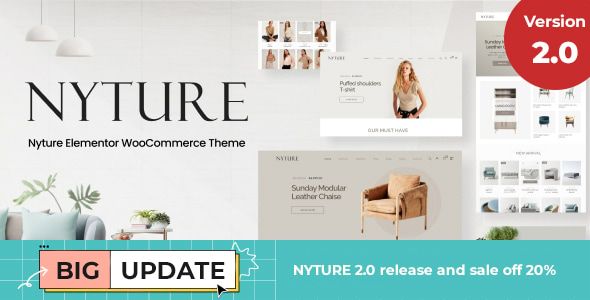
Picking the right WooCommerce theme is less about finding the one with the most features and more about choosing the right foundation. It's an architectural decision. For a niche as visually driven as furniture, this choice is even more critical. You need a theme that showcases large, high-quality images, handles complex product variations with grace, and provides a clean, trustworthy user experience. In this crowded market, one name that frequently appears is the Nyture - Furniture WooCommerce Theme. It promises a modern, minimalist design backed by the power of Elementor and a suite of e-commerce tools. But promises on a sales page often wilt under the harsh light of a real development environment. As a developer who has wrestled with countless themes, my goal here isn't to rehash the feature list. It's to put Nyture through its paces, from installation to performance testing, to see if it's a solid blueprint for a professional furniture store or just another pretty facade hiding a bloated, inflexible core.
Part 1: The First Impression - Unboxing and Setup
The initial setup process of a premium theme is its first test. It tells you a lot about the developers' attention to detail and their consideration for the end-user. A smooth, guided installation inspires confidence; a messy, error-prone one is a major red flag.
Step 1: Pre-flight Checks
Before you even think about uploading the theme zip, let's talk environment. This isn't a simple blog theme. Nyture is built for WooCommerce and leans on a heavy-hitter page builder. Your hosting needs to be up to the task. At a minimum, you should ensure your server is running:
PHP 7.4 or higher (8.0+ recommended): Running an outdated PHP version is asking for security vulnerabilities and performance bottlenecks.
WordPress Memory Limit: 256MB is a safe minimum. WooCommerce itself is resource-intensive, and adding Elementor, sliders, and other plugins will quickly eat up memory. You can often set this in your
wp-config.phpfile withdefine('WP_MEMORY_LIMIT', '256M');.Max Execution Time: Set this to at least 300 seconds. The demo import process can be lengthy, and you don't want it timing out halfway through.
Skipping these checks is the number one cause of failed demo imports and "white screen of death" errors. Get your foundation right before you start building.
Step 2: Theme and Child Theme Installation
The Nyture package from ThemeForest comes with the standard fare: the parent theme zip (nyture.zip), a child theme zip (nyture-child.zip), documentation, and licensing info. Your first instinct might be to just upload and activate nyture.zip. Don't.
Always, without exception, install the parent theme but activate the child theme. Why is this non-negotiable? Any custom CSS, PHP functions, or template file modifications you make should go into the child theme. When the parent theme receives an update from the developers, you can update it without overwriting and losing all your hard-earned customizations. Working without a child theme is a ticking time bomb for any serious project.
Step 3: The Plugin Onslaught
Upon activating the child theme, you'll be greeted by the familiar TGM Plugin Activation screen, prompting you to install a list of required and recommended plugins. For Nyture, this list is substantial:
Required: Elementor, WooCommerce, Nyture Core (the theme's functionality plugin), Kirki Customizer Framework.
Recommended: Revolution Slider, Contact Form 7, MailChimp for WordPress, and a handful of WooCommerce extensions for variation swatches, wishlists, and comparison.
This is a classic page-builder theme dependency model. The "Nyture Core" plugin is a smart move; it separates core functionality from the theme itself, so if you ever switch themes, you don't lose your custom post types or shortcodes. However, the reliance on Revolution Slider is a bit dated. While powerful, it's known for being heavy and can be a significant performance drag if not used carefully. The WooCommerce extensions are a mixed bag. It's great that they are included, but it also means your store's core features are now dependent on a disparate set of third-party plugins, each with its own update cycle and potential for conflicts.
Step 4: The One-Click Demo Import
With the plugins installed and activated, it's time for the moment of truth: the demo import. Nyture uses the One Click Demo Import plugin, which is fairly standard. You navigate to Appearance > Import Demo Data and select from several pre-built homepages. I chose the main furniture demo.
The process took about five minutes on my development server, which is reasonable. It churned through importing content, widgets, and customizer settings. The result? Surprisingly accurate. The imported site looked about 95% identical to the live demo, which is better than many themes I've worked with. The only common hiccup was with Revolution Slider; sometimes you need to import its sliders separately, which was the case here. The documentation pointed this out, so it wasn't a major roadblock.
Part 2: Under the Hood - A Developer's Critique
With a functional replica of the demo site running, it's time to dig deeper. How is this thing actually built? How easy is it to mold into a client's specific vision?
The Elementor Integration: Power vs. Lock-in
Nyture is, for all intents and purposes, an Elementor theme. The homepage, about pages, and other custom layouts are built entirely with the page builder. Nyture provides a solid set of custom Elementor widgets specifically for its design, such as unique product grid styles, category showcases, and testimonial sliders. These are well-designed and integrate seamlessly with the theme's aesthetic.
This is fantastic for rapid development and for clients who want to be able to edit their own content visually. The drag-and-drop interface allows you to re-arrange sections, swap out images, and change text with zero code. You can build complex layouts that would otherwise require significant custom development.
However, this deep integration comes with a trade-off: developer lock-in. Your site's entire visual structure is now tied to Elementor. If you ever decide to deactivate Elementor, you'll be left with a mess of shortcodes and broken layouts. This also means you're adding the entire weight of Elementor's CSS and JavaScript to every page, which has performance implications we'll discuss later. For many projects, this is a perfectly acceptable trade-off for the speed and flexibility it offers, but it's a critical strategic decision to be aware of from the start.
The Theme Options Panel (Kirki Framework)
Global settings—those that affect the entire site—are controlled via the native WordPress Customizer, powered by the Kirki Framework. This is a solid choice. It's more lightweight than older, clunky theme options panels (like Redux) and provides a live preview as you make changes. The options are logically organized:
Header: Multiple header layouts, sticky header options, logo uploads, and menu styling.
Footer: Widget column configurations and copyright text.
Typography: Google Fonts integration for body text and headings. It's robust, allowing you to fine-tune font sizes, weights, and line heights for desktop and mobile.
Styling: Global control over the primary and secondary colors of the theme.
Blog & Shop: Layout options for archive pages (grid/list, sidebar position) and single posts.
The panel is comprehensive without being overwhelming. It strikes a good balance, giving you control over the important global elements while leaving page-specific layouts to Elementor.
Mobile Responsiveness
Nyture claims to be fully responsive, and on the surface, it is. The layouts adapt to different screen sizes without obvious breaking points. However, a "responsive" check box isn't enough. The quality of the mobile experience is what matters. In my testing, Nyture does a decent job. The mobile menu is a clean, full-screen overlay that's easy to navigate. Product grids reflow into a single column, which is standard.
My main critique is with the mobile typography and spacing. Some of the default heading sizes feel a bit too large on smaller screens, and some Elementor sections could use better mobile-specific padding adjustments out of the box. Thankfully, Elementor's responsive controls make this easy to fix. You can (and should) go through your key pages and tweak the font sizes, margins, and padding specifically for tablet and mobile breakpoints. The theme provides a good starting point, but don't expect mobile perfection without some manual tuning.
Part 3: The E-commerce Engine
A furniture store isn't just a brochure; it's a machine for selling. How does Nyture enhance the core WooCommerce experience to better serve this niche?
Product Page Layouts
Nyture offers several layouts for the single product page, which is crucial for furniture. You can choose from layouts with a sticky product summary, a gallery-focused view, or a tabbed layout for extensive descriptions. This flexibility is excellent. For a sofa, you might want a layout that showcases a large image gallery and material swatches. For a complex office chair, a tabbed layout with sections for dimensions, features, and warranty information would be more appropriate. These layouts can be set globally or on a per-product basis.
Shop & Archive Page Features
The shop page is where Nyture shines. The key features include:
AJAX Filtering: This is a must-have for a modern e-commerce site. Customers can filter products by price, category, or attributes (like color or material) without the entire page reloading. It's fast and smooth.
Variation Swatches: The bundled plugin replaces the standard dropdown menus for variable products with visual swatches (e.g., color squares or material images). This is infinitely better for selling furniture, where visual selection is key.
Quick View: Allows customers to view product details in a modal window directly from the shop page, which can help reduce clicks and speed up the browsing process.
Wishlist & Compare: These features, also powered by bundled plugins, add valuable functionality for users who are comparison shopping for big-ticket items.
These enhancements are well-implemented and directly address the needs of an online furniture retailer.
Part 4: Performance, SEO, and Code Quality
A beautiful store that is slow, invisible to Google, and impossible to customize is a failed project. This is where we separate the great themes from the merely good ones.
Speed and Performance Analysis
Let's be direct: out of the box, with the full demo content and all plugins active, Nyture is not a performance champion. This is the reality of virtually all feature-rich, page-builder-based themes. My initial GTmetrix scan on an un-cached site showed a load time of around 3.5 seconds and a page size of over 2.5MB. This isn't terrible, but it's far from ideal.
The main culprits are what you'd expect:
Unoptimized Images: The demo images are large. You must compress your product photography.
HTTP Requests: The theme, WooCommerce, Elementor, and a dozen other plugins all load their own CSS and JavaScript files, leading to a high number of requests.
Heavy Assets: Revolution Slider and the large JavaScript libraries from Elementor contribute significantly to the page weight.
Can it be fixed? Absolutely. With a good caching plugin (like WP Rocket or a server-level cache), image optimization (like ShortPixel), and an asset cleanup tool (like Perfmatters or Asset CleanUp), you can drastically improve these scores. A developer can get a Nyture-based site loading in under 2 seconds. The key takeaway is that you will need to perform these optimizations. Performance is not a feature that comes pre-configured.
The platform gpldock provides access to premium tools that can help with this, giving you the building blocks for a high-performance site without the high price tag for every single plugin.
SEO Friendliness and Code Structure
From an SEO perspective, Nyture gets the fundamentals right. The heading structure on pages is logical (a single followed bys for main sections). The code is semantic, and it integrates well with SEO plugins like Yoast or Rank Math, allowing them to control titles, meta descriptions, and schema markup.
WooCommerce by itself does a decent job with product schema, and Nyture doesn't interfere with that, which is good. Your products will be eligible for rich snippets in Google search results (showing price, availability, and ratings).
For developers looking to extend the theme, the code is reasonably clean and follows WordPress standards. There are enough action hooks and filters in the templates to allow for customization without directly editing the parent theme files. This, combined with the child theme, makes Nyture a viable base for more complex projects that require custom functionality.
Is Nyture the Right Foundation for Your Furniture Store?
After a thorough tear-down, the picture of Nyture becomes clear. It's not a lightweight, minimalist framework, nor does it pretend to be. It's a comprehensive, feature-packed solution designed for rapid deployment of a visually appealing and highly functional furniture store.
You should choose Nyture if:
You value speed of development and want to leverage the power of Elementor's visual editor.
You need robust e-commerce features like AJAX filtering and variation swatches out of the box.
You are building a site for a client who needs to be able to easily manage their own content and page layouts.
You are prepared to spend time on performance optimization post-launch.
You might want to look elsewhere if:
Your number one priority is bleeding-edge performance and a minimal footprint. In that case, a block-based theme or a custom build might be better.
You are fundamentally against page builders and the potential for code bloat and lock-in they represent.
Your project requires extremely unique, unconventional layouts that go beyond what a pre-built theme structure can offer.
Ultimately, Nyture is a strong contender in its niche. It makes a trade-off: it sacrifices some out-of-the-box performance for an incredible amount of flexibility and pre-built functionality. For many businesses, this is the right trade. It provides a solid architectural foundation that, with a developer's touch for optimization and customization, can be built into a fast, effective, and beautiful online furniture store. While Nyture provides a fantastic starting point, it's always wise to explore the landscape. On platforms where you can find a wide variety of Free download WordPress themes, you have the freedom to compare different architectures and find the perfect fit for your project's specific needs before you commit.