Connecting to Deco dos not achieve full fibre speed
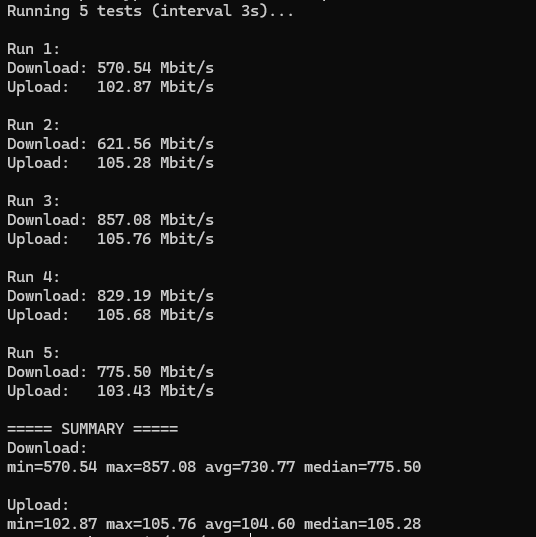
I connected a Raspberry Pi directly to the Plusnet router, and it shows the expected Fibre 900 speeds for both upload and download.
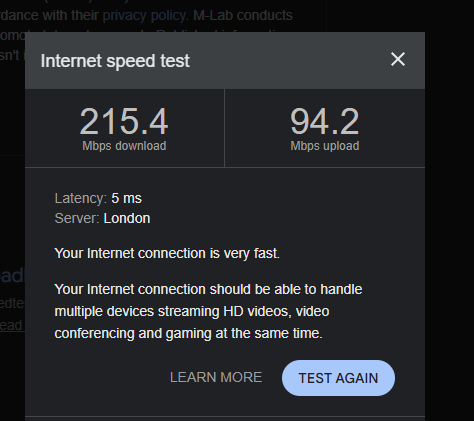
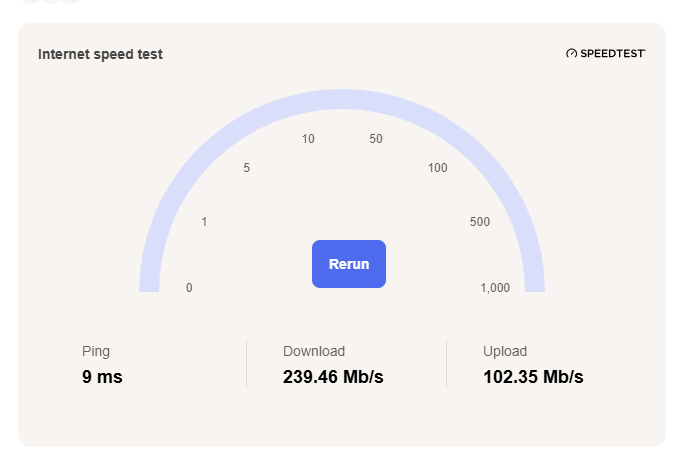
However, I don’t get the full speed when connecting through the Deco router, even though the device itself is connected by Ethernet. The Deco router is connected to the Plusnet Hub 2.
My guess is that the issue is the Deco mesh backhaul: the satellite Deco units are connecting to the main Deco wirelessly, so the wireless backhaul becomes the bottleneck. Ideally, the Deco units should use wired Ethernet backhaul to achieve close to full Fibre 900 speeds.

Steem to the Moon🚀!
- You can rent Steem Power via rentsp!
- You can swap the TRON:TRX/USDT/USDD to STEEM via tron2steem!
- You can swap the STEEM/SBD to SUI via steem2sui!
- You can swap the STEEM/SBD to SOL Solana via steem2sol!
- You can swap the STEEM/SBD to ETH Ethereum via steem2eth!
- You can swap the STEEM/SBD to Tether USDT (TRC-20) via steem2usdt!
- You can swap the STEEM/SBD to TRX (TRON) via steem2trx!
- You can swap the STEEM/SBD to BTS (BitShares) via steem2bts!
- Register a free STEEM account at SteemYY!
- Steem Block Explorer
- ChatGPT/Steem Integration: You can type !ask command to invoke ChatGPT
- Steem Witness Table and API
- Other Steem Tools

Support me, thank you!
Why you should vote me? My contributions
Please vote me as a witness or set me as a proxy via https://steemitwallet.com/~witnesses

Hi @justyy Today, the bot missed upvoting again. Please, check it 🙏
https://steemit.com/h4lab-research/@happycapital/btc-dominance-has-been-consolidating-since-last-july
Done.