STEEMHOME · PRODUCT UPDATE
Hello steemians,
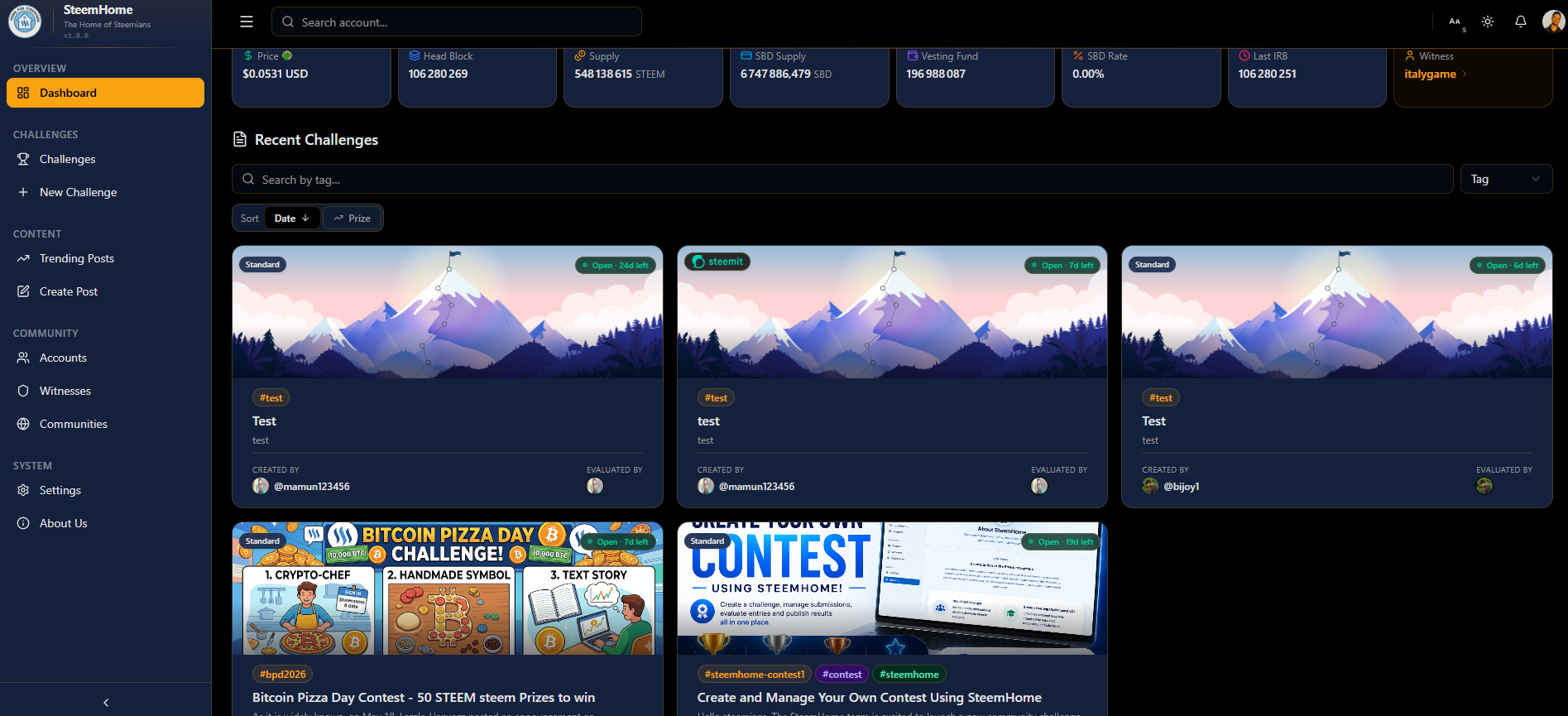
SteemHome is a browser-based dashboard for the Steem blockchain. Beyond browsing posts, accounts, and wallets, it introduces something new: a fully-featured challenge management system that lets community organizers create writing contests, assign evaluators, score submissions with weighted criteria, and publish official results all without leaving the browser.
All challenge data is tied to your Steem account. No registration, no third-party platform, just your existing Steem credentials.
What Is the Challenge Module?
Challenges are the distinctive feature of SteemHome. They let a community organizer define a Steem writing contest and coordinate structured scoring by a team of evaluators.
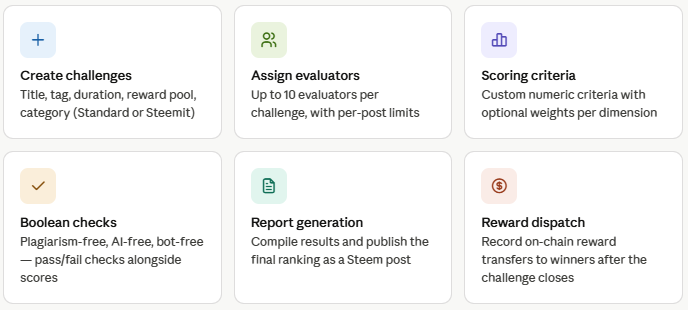
Here is everything the challenge module covers:
| Feature | Description |
|---|---|
| Create challenges | Title, tag, duration, reward pool, category (Standard or Steemit) |
| Assign evaluators | Up to 10 evaluators per challenge, with configurable per-post limits |
| Scoring criteria | Custom numeric criteria with optional weights per dimension |
| Boolean checks | Plagiarism-free, AI-free, bot-free, pass/fail checks alongside scores |
| Report generation | Compile results and publish the final ranking as a Steem post |
| Reward dispatch | Record on-chain STEEM transfers to winners after the challenge closes |
🔄 The Challenge Lifecycle
From setup to reward, every challenge follows the same five-step flow:

Step 1 : Setup
The organizer fills in the challenge form: a title, a Steem tag (only posts using this tag appear as submissions), a duration in days (1–30), an optional reward amount in STEEM, and the list of evaluators.
Step 2 : Publish
SteemHome generates a formatted challenge announcement post. The creator can preview it, edit the description in Markdown, and broadcast it to the blockchain in one click.
Step 3 : Evaluate
Evaluators open the challenge detail view, which automatically pulls all recent Steem posts tagged with the challenge tag. For each submission, they enter a numeric score per criterion and toggle the pass/fail boolean checks.
Step 4 : Report
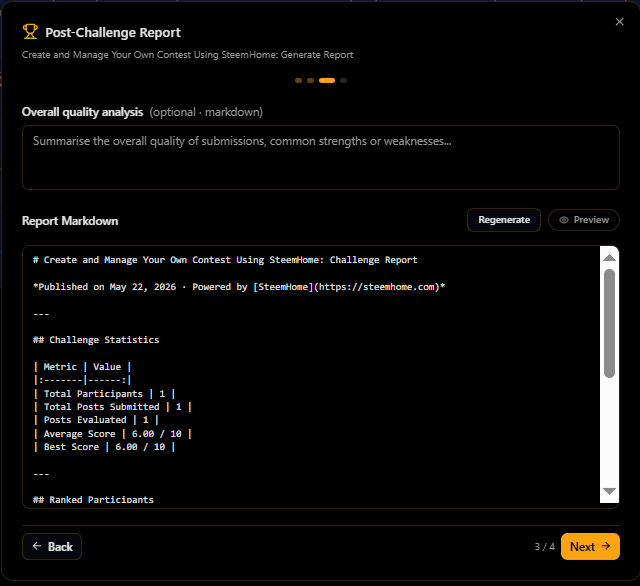
Once the deadline passes, SteemHome aggregates all evaluations, computes the final weighted ranking, and generates a ready-to-publish Markdown report complete with a prize distribution table.
Step 5 : Reward
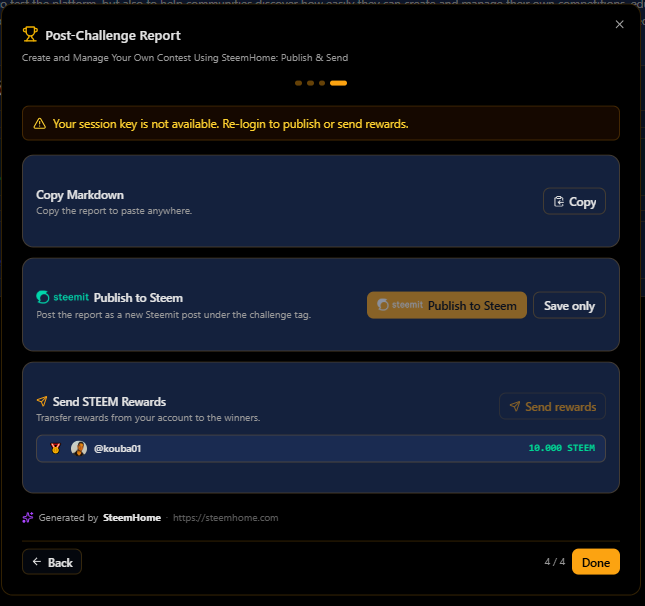
The organizer records each STEEM transfer to the winners directly inside the app. All transfers are logged on-chain.
How Scoring Works
Each evaluation criterion has:
- A name (e.g. "Content quality", "Originality")
- A maximum score (1–100)
- An optional weight (1–10) higher weight = more influence on the final score
The final score for a post is the weighted average of all evaluator scores across all criteria.
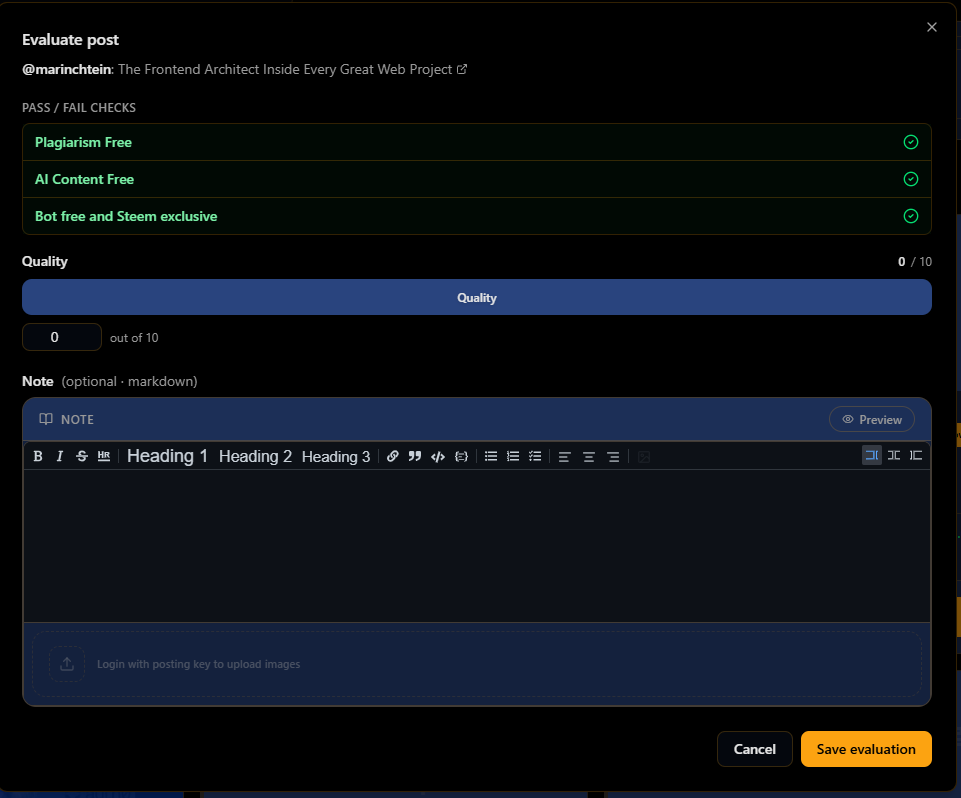
Example evaluation
Post by @example.user Challenge: #steem-writing-contest
Boolean quality checks
Alongside the numeric score, evaluators toggle three pass/fail checks:
- ✅ Plagiarism Free : the content is original
- ✅ AI Content Free : the post was written by a human
- ✅ Bot free and Steem exclusive : posted organically, not cross-posted by a bot
These checks appear alongside the scores but do not affect the numeric final score : they serve as visible flags for the community.
Setting Up a Challenge
When creating a challenge, the organizer specifies:
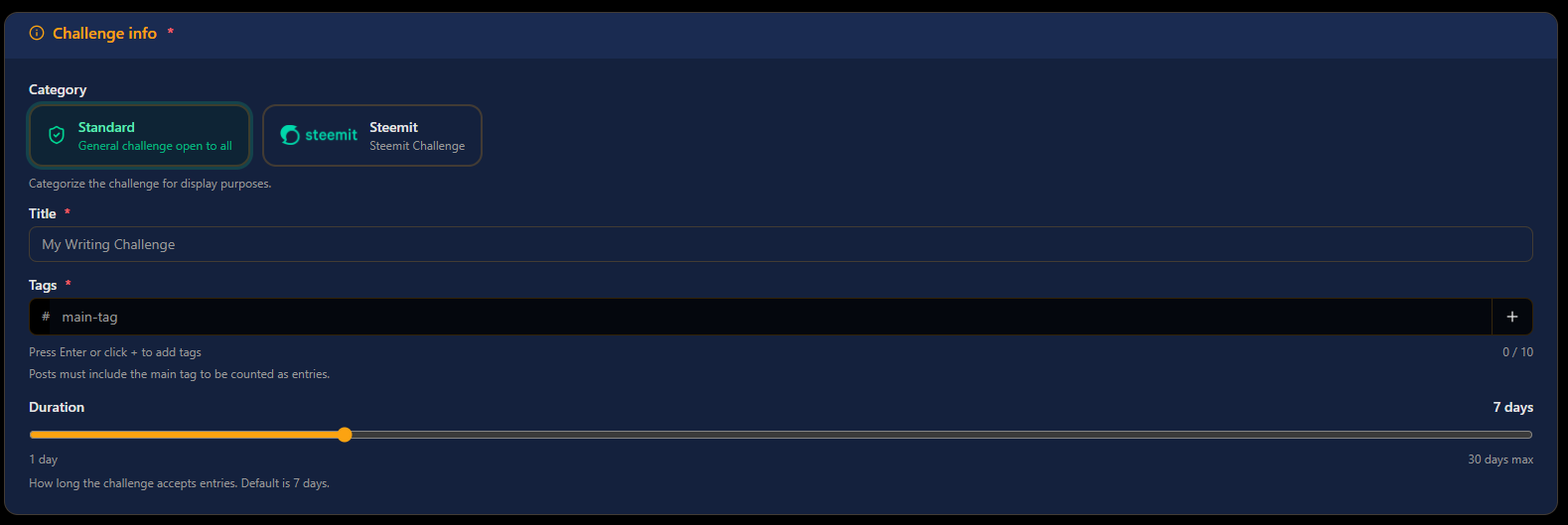
- Title : displayed in the challenge list and published announcement
- Tag : the Steem tag used to collect submissions automatically
- Additional tags : up to 9 extra tags for the announcement post
- Category : Standard (open to all) or Steemit (official Steemit challenge)
- Duration :1 to 30 days from creation date
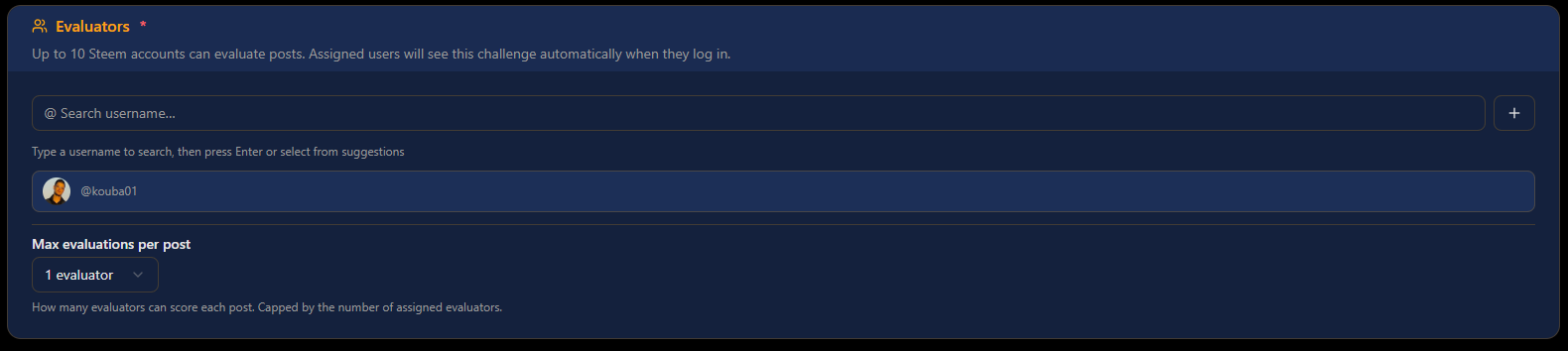
- Evaluators : up to 10 Steem usernames
- Max evaluators per post : how many evaluators must score each post (1 to the total evaluator count)

- Scoring criteria : at least one criterion with name, max score, and optional weight
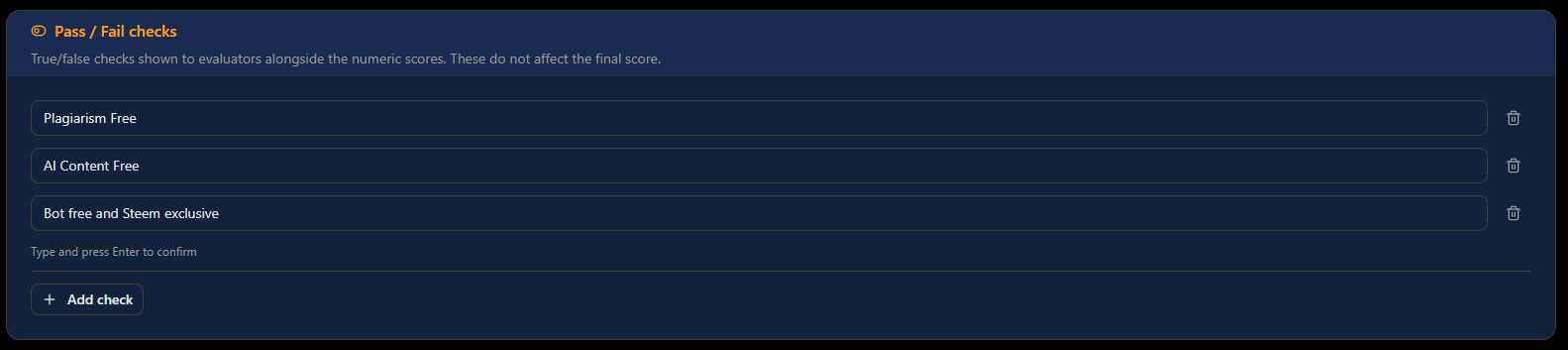
- Boolean criteria : the three default checks, plus custom ones if needed
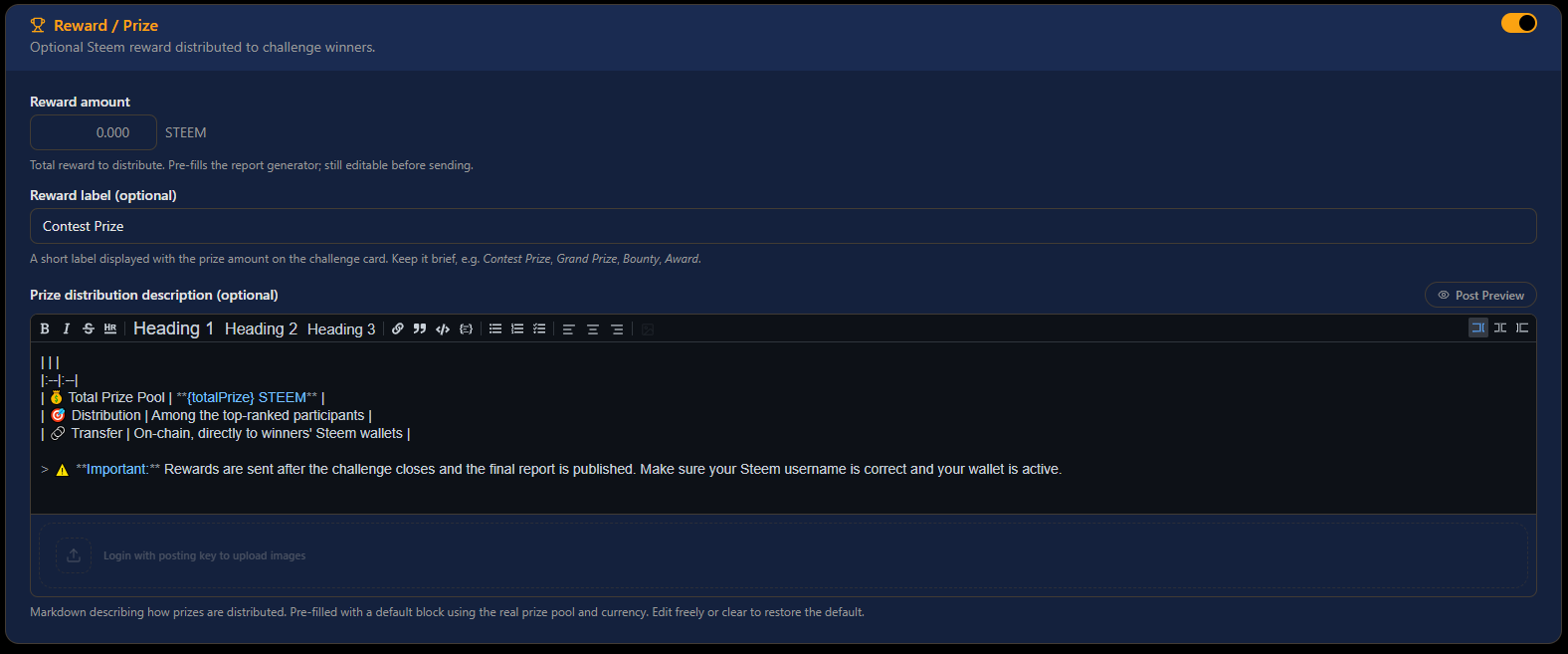
- Reward : optional amount (e.g.
10.000 STEEM) and label (e.g. "Prize Pool")
Only the challenge creator can edit or delete a challenge. Evaluators can only submit and edit their own evaluations.
The Evaluation Panel
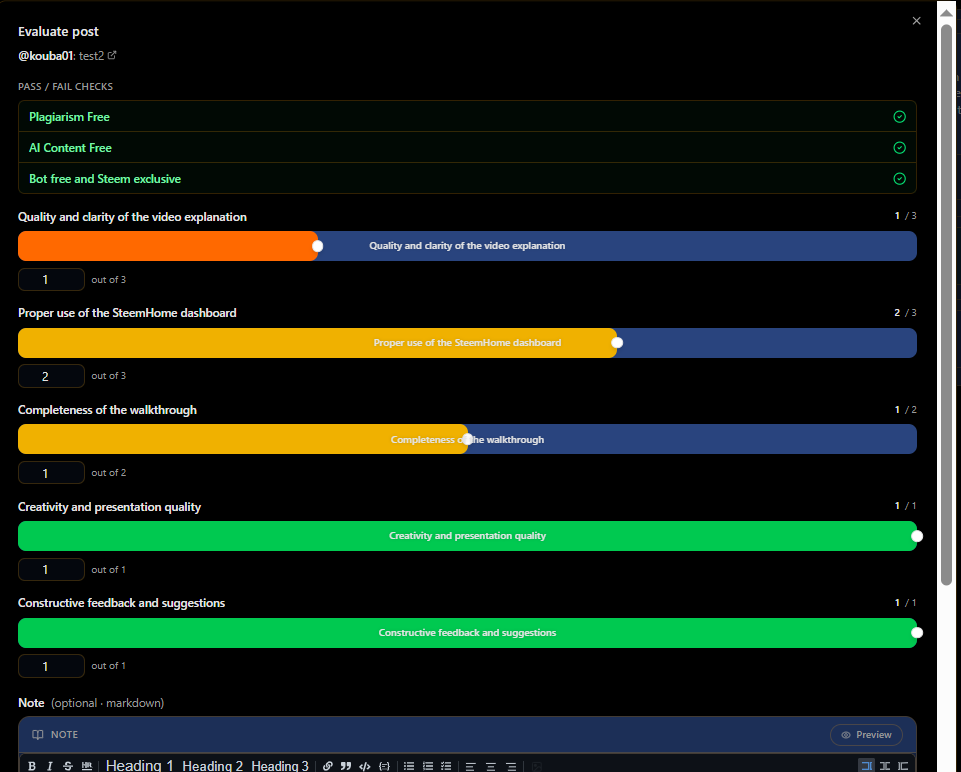
When an evaluator opens a submission inside a challenge, they see:
- The full Steem post rendered inline
- A scoring panel with one input per criterion (0 to max score)
- Toggle switches for each boolean check
- An optional comment field
- A Save button which stores the evaluation and posts a formatted comment to the Steem post summarizing the scores
The evaluation comment posted on-chain looks like this:
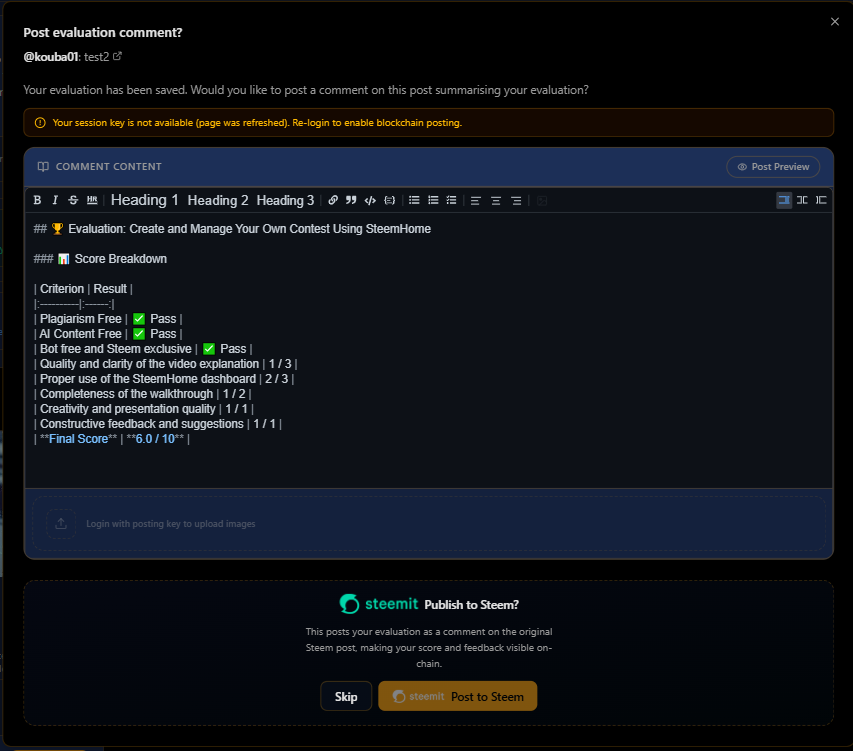
The Challenge Detail View
The challenge detail page automatically pulls posts from the Steem blockchain that use the challenge tag. From this view, evaluators and the creator can:
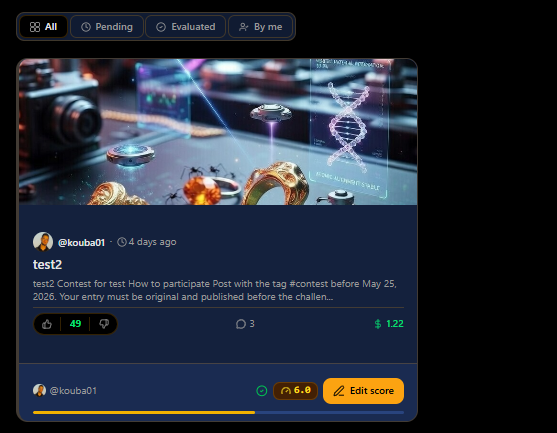
- Filter submissions: all posts / not evaluated yet / already evaluated / evaluated by me
- Sort by score (highest first or lowest first)
- See at a glance how many submissions have been evaluated vs. how many remain
- Open any post inline to read and score it without leaving the page
The creator also sees two extra controls:
- Edit challenge : update criteria, evaluators, or description at any time
- Post challenge report opens the report generation dialog after the deadline
Report Generation & Reward Dispatch
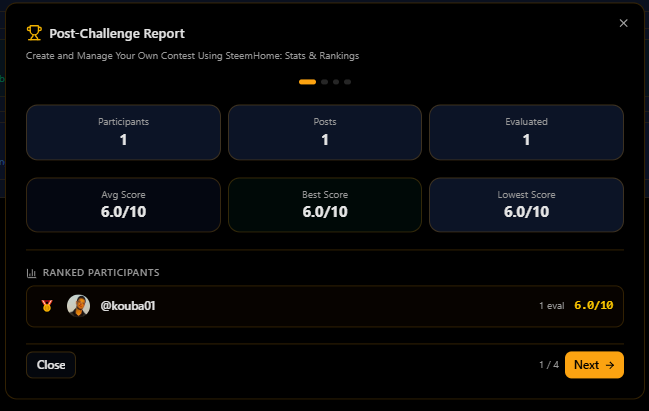
Once the challenge ends, the creator opens the Post Challenge Report dialog. SteemHome:
- Fetches all stored evaluations
- Computes each post's final weighted score (average across evaluators)
- Ranks posts from highest to lowest score
- Generates a full Markdown report including:
- A ranked leaderboard table with authors, scores, and post links
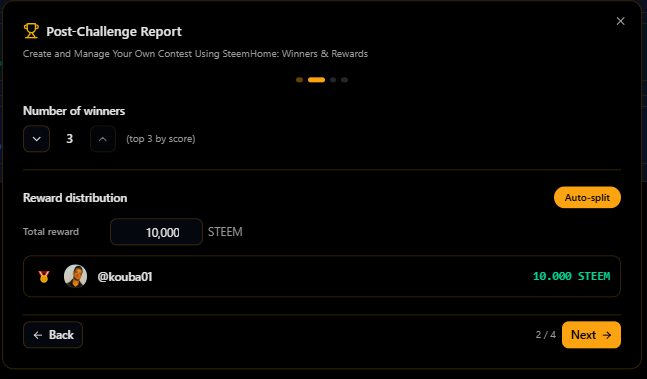
- A prize distribution table
- A summary of total evaluations
The creator can preview the report, make edits, select the winning usernames, and publish it as an official Steem post in one click.
After publishing, the Reward Dispatch feature lets the creator record each STEEM transfer to winners. These records are stored and linked to the challenge, giving a transparent audit trail.
 |  |
|---|
 |  |
|---|
Under the Hood
The challenge module is built with React + TypeScript. Data is split across two layers:
| Layer | What it stores |
|---|---|
| Supabase (off-chain) | Challenge configurations, scoring criteria, evaluator lists, evaluation scores |
| Steem blockchain (on-chain) | Challenge announcement posts, evaluation comments, reward transfers |
Authentication uses the Steem Keychain browser extension or a direct posting key. Every write operation (saving an evaluation, publishing a report, linking a post) requires explicit signing nothing is broadcast without your approval.
Try It Yourself
SteemHome is free to use. To access the challenge module:
- Go to steemhome.com
- Click Login and enter your Steem username
- Authenticate with Keychain or your posting key
- Navigate to Challenges in the sidebar
- Click New Challenge to create your first contest
You can assign yourself as the sole evaluator to test the complete flow — from setup to scoring to report generation — without needing a team.
Questions or feedback? Leave a comment below or reach out on the SteemHome GitHub. We are actively improving the challenge system based on community feedback.
@adeljose @kibreay001 @alexanderpeace @dasudi @lirvic @josepha @lunasilver @max-pro @muzack1 @bijoy1 @ninapenda @oswaldocuarta @ruthjoe @solaymann @suboohi @pea07 @sohanurrahman @wakucat @steem-bingo @damithudaya @m-fdo @joslud @frafiomatale @steemkidss @pandora2010 @steemit-ironchef @solperez @crismenia @mariami @hive-141434 @joshrone @tahispadron @miftahulrizky @teamvenezuela @mamun123456 @luxalok @danapalooza @fjjrg @davidesimoncini @mrnazrul @naturesteem @danapalooza @hive-118902 @xkool24 @steemone.com @roohiasif99 @evagavilan @luisito01 @mdshanto @ngoenyi @steem4nigeria @natz04 @solaymann @lhorgic @wakeupkitty @olivia08
Vote for @kouba01
If you believe in my work and would like to support my witness campaign, you can vote for @kouba01 on the witness voting page:
https://steemitwallet.com/~witnesses
Every vote is greatly appreciated and helps support my future contributions to the Steem ecosystem.
Thank you for your support and for believing in the future of Steem.
SteemHome Team
@kouba01
@marinchtein
@steemcurator01

I was JUST brainstorming a contest hub moments before I stumbled upon a link to steemhome! Love it.
Do you open source your code? I'm a little afraid to implement using keychain login for my site Open for Product. Maybe I should take a look at some working code to ensure I do it correctly.
That’s awesome to hear A contest hub is exactly the kind of idea I’d love SteemHome to help with.
For now, the code is not fully open source yet, but I’m open to sharing examples or guidance for the Steem Keychain login flow.
I totally understand being careful with Keychain integration. It’s important to implement it correctly and safely, especially when users connect their accounts.
If you’re building Open for Product, I’d be happy to exchange ideas too. It sounds like our projects may have some interesting overlap.
Open for Product is separate from the Contest Hub I was thinking of. From the looks of it, SteemHome covers it. I just hardly ever get involved in contests because there are so many manual steps, all written out in plain text ... I just get overwhelmed. I figured if authors had a control panel where they could configure timeline, rules, automate delegations, etc. and where participants could just click "Join", and have the specifics taken care of in some way, it would make participation much easier, and contest management more seamless maybe.
Here's the Open for Product community here on Steem. The idea is that Open for Product is a platform cooperative, where professionals join or create projects on a come and go basis, and the platform and community help orient projects in the right direction, and keep momentum, even as people come in and out, etc. We feature equitable revenue distribution from collectively created products and services, and democratic governance.
I call it your work away from work.
I'm working on integrating posts from my web app with Steem, which is why I'm looking into Keychain functionality.
I'd appreciate a chat, and it would be great to hear about your long term vision. If you want to reach out on Twitter, that's probably easiest since Steem doesn't have DMs: [@primevaldad[(https://x.com/primevaldad)
You have come up with some very amazing updates. I can see many new features here. I will definitely try to experience it. If I encounter any problems anywhere, I will definitely let you know. I hope everyone will use it and explore something new.
Thank you so much ! That really means a lot to me. I’ve been working hard on adding new features and improving the overall experience step by step.
Please definitely let me know if you face any issues or have suggestions while testing. Real feedback helps me improve the platform much faster. I also hope more people will explore it, try the new features, and help shape it together.
Upvoted! Thank you for supporting witness @jswit.
Curated by: @ahsansharif